Use cases

Equipment rental software for a small rental shop

Your projectors, cleaners and speakers each rent differently. Rental Suite gives every item its own stock count, rates and deposit, and your website and counter book from the same shelf.

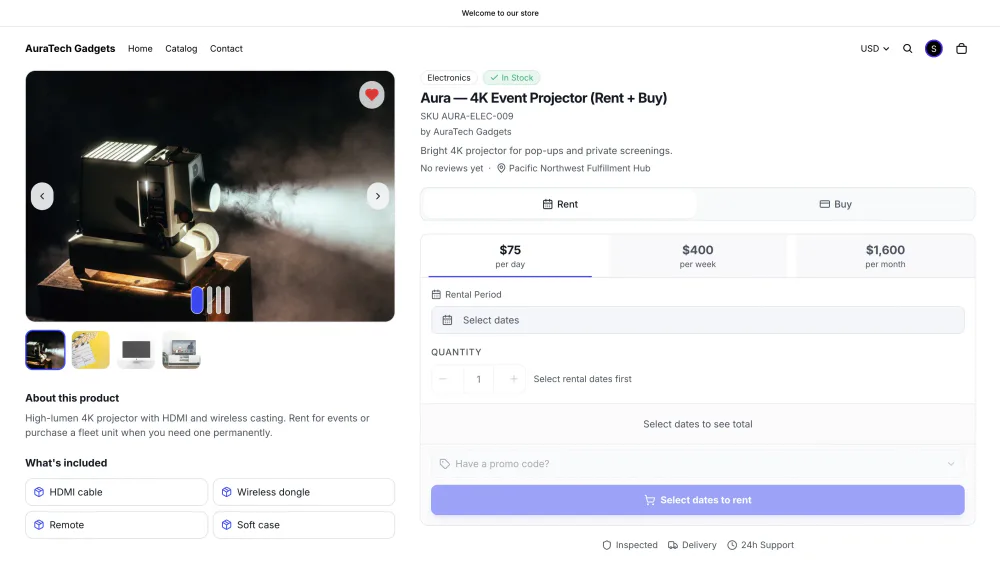
Projector product page with Rent and Buy tabs, day, week and month rates, the rental period picker, a quantity field and a What's included list

01See it in action

See how an equipment rental shop runs in Rental Suite

A short walkthrough in the Rental Suite admin, with voiceover. It plays muted; press Play with sound to hear it from the start.

02Overview

Equipment rental software that fits how you rent

A small equipment rental shop rarely rents one kind of thing. You might have two 4K projectors, five carpet cleaners, a stack of PA speakers and a box of extension leads, each with a different value, a different daily price and a different idea of how long a customer should keep it. Equipment rental software has to hold all of that without forcing every item into one rule.

Rental Suite runs inside your online store. Each rental product gets a unit count, day, week and month rates, a deposit and its own availability rules, and the date picker on the product page only offers days you can actually fill. Bookings you take by phone or at the counter come off the same count.

It fits shops that rent portable gear by the day, week or month. If you rent excavators by meter hours or send a crew with every job, it isn't built for that, and the limits are listed further down.

04In practice

A day in an equipment rental shop

Equipment rental management software built on one stock count

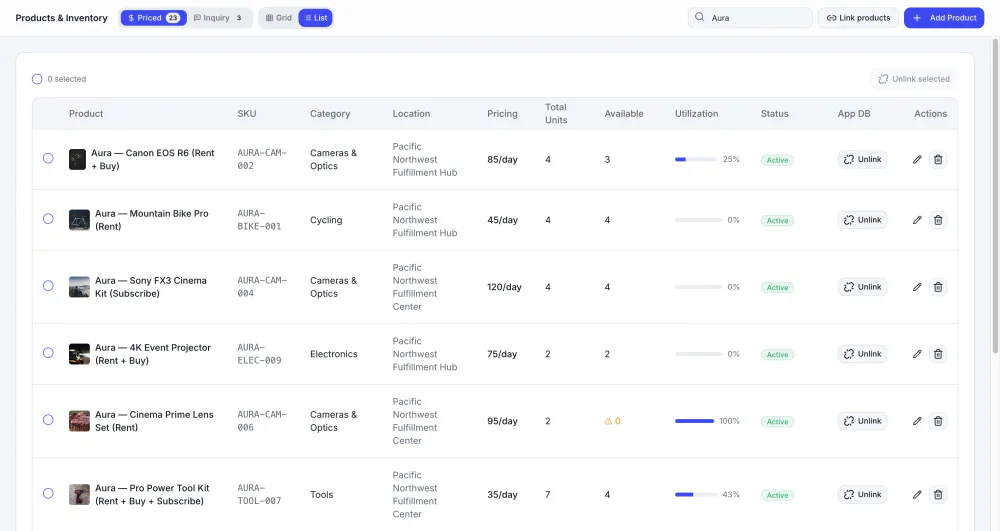
The Products and Inventory list shows every rental item with its daily rate, total units, units free now and how much of it is out today. Set Total Units once per product: a booking for two speakers takes two, and the next customer that weekend only sees what's left.

For your dearer gear, switch on per-unit tracking. Each unit then gets a serial number and a condition, so you know which projector went to which customer and which one came back with a dead pixel.

  • Total units and units free on one list
  • A utilization bar for how much of each item is out today
  • Per-unit serial tracking where you need it
Rental Suite
Products and Inventory list in Rental Suite with the daily rate, total units, units available, a utilization bar and status for each rental product

Rental software for equipment priced by the day, week and month

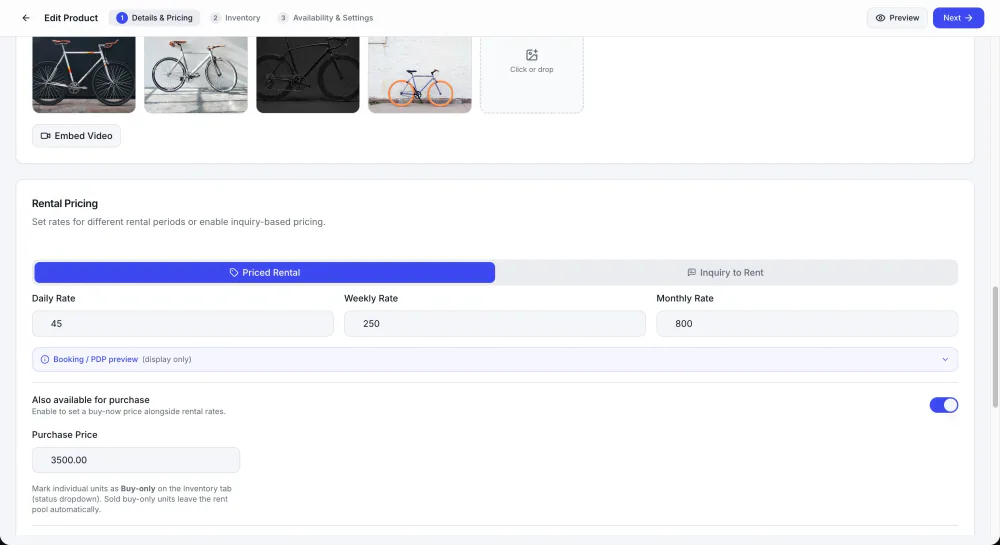
In the Rental Pricing card you set a daily rate and, if longer jobs get a better price, a weekly and a monthly rate. Rental Suite uses the daily rate for 1 to 6 days, the weekly rate from 7 days and the monthly rate from 30, each split into a price per day. Ten days costs ten days at the weekly price, not two full weeks.

The same card has Also available for purchase. Turn it on and the product page gets a Buy tab next to Rent, which is handy for ex-rental units you'd like to sell on.

Rental Suite
Rental Pricing card in the product editor with daily, weekly and monthly rates and the Also available for purchase option

A deposit that matches what the item is worth

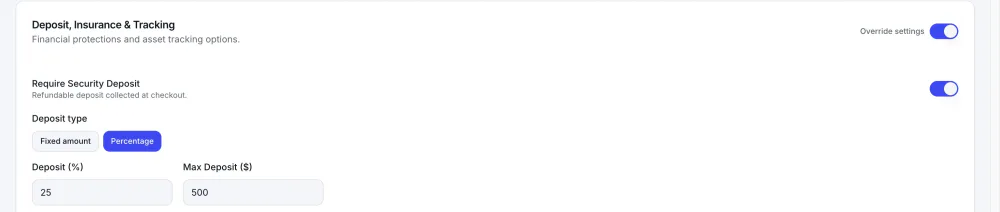
Shop-wide, the deposit is a percentage of the rental with a maximum, which suits most of a mixed catalogue. On a product that needs more, switch on Override settings and give it its own percentage and cap, or a fixed amount.

The deposit is added to the total on the product page, paid at checkout with the rental and refunded through the order when the booking is marked returned. Rental Suite refunds the full amount, so if something comes back damaged, you settle that with the customer yourself.

Rental Suite
Product deposit settings with the percentage type selected, a 25 percent deposit and a 500 dollar maximum

Equipment rental booking software with a calendar for each item

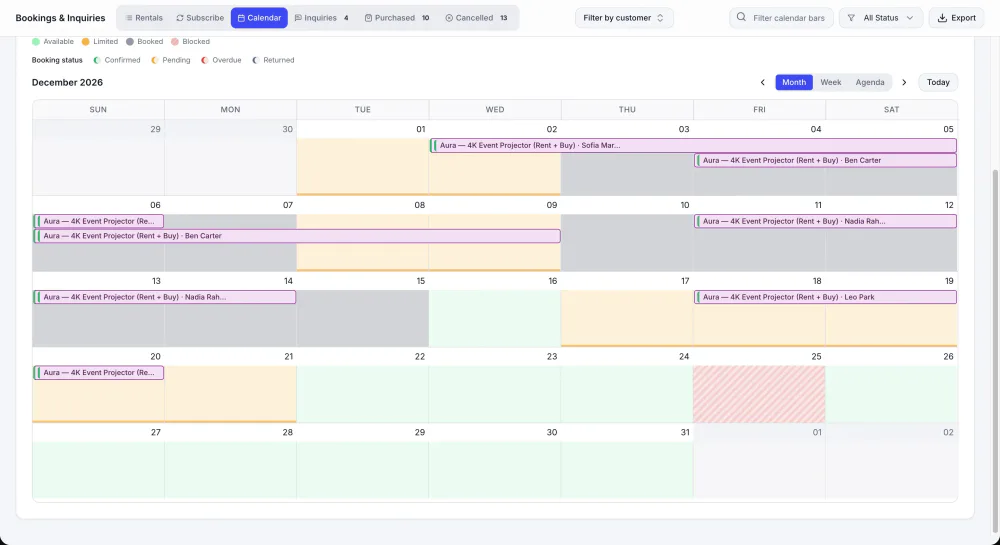
Filter the bookings calendar to one product and switch on the availability overlay: free days in green, days with a few units left in amber, fully booked days in grey and blocked days marked. When a customer asks whether the projector is free in three weeks, that's your answer in one look.

Phone and counter bookings go in through New Booking, which checks the units free for the dates before it lets you book and creates an order in your store, the same as an online booking.

Rental Suite
Bookings calendar for one projector with booked days in grey, limited days in amber, free days in green and Christmas Day blocked

Where Rental Suite stops for equipment shops

Rental Suite is made for portable equipment booked by the day. It doesn't track machine hours or meter readings, schedule drivers or plan delivery routes, store operator certificates, sync with Google Calendar or iCal, or add late fees. There's no GPS tracking and no waiver or ID check.

Delivery and shipping rates come from your store's own checkout settings. If your shop rents excavators or sends an operator with every machine, a construction rental system will suit you better.

06How it works

Set up an equipment rental shop in 5 steps

The order most shops follow in the Rental Suite admin.

  1. Link the items you rent out

    Install Rental Suite, link the store products you rent and give each one a rental profile.

  2. Set units and rates

    Enter Total Units and the daily, weekly and monthly rates for each product.

  3. Set your shop rules

    Choose the default minimum and maximum rental days, turnaround days and deposit in Settings, then override them on the items that need it.

  4. Add the date picker

    Add the Rental product page block in your theme editor so shoppers pick dates and see the total before checkout.

  5. Book and check back in

    Online orders and New Booking fill the same calendar. Mark each rental returned when it's back to free its units and refund the deposit.

08Get started

Put your equipment on one calendar

Start on the Free plan with up to 20 bookings a month, add your rental items and take your first booking from the product page.

09FAQ

Equipment rental software questions

Still have questions?

Ask the team that builds the app. We reply within one business day.

What is equipment rental software?

Equipment rental software tracks which items are free on which dates, prices each rental and takes the booking and payment. Rental Suite does this inside your online store, for gear rented by the day, week or month.

Can a small equipment rental business use Rental Suite?

Yes. The Free plan covers 20 bookings a month, and paid plans raise that to 200, 500 or unlimited, so a one-person shop and a shop with a counter team use the same setup.

Can I rent and sell the same equipment?

Yes. Turn on Also available for purchase and the product page gets a Buy tab next to Rent. Sold units leave the rental stock, and tracked units you mark Buy-only are never rented.

Does Rental Suite work for heavy or construction equipment rental?

Not well. It has no meter or hour tracking, dispatch, operator records or GPS, which those shops depend on. It suits portable equipment rented by the day, week or month.

How do I stop two customers booking the same item?

Sell from one count. Rental Suite checks the free units for the dates on the product page and in New Booking, and holds the dates while a customer is in checkout, 60 minutes by default.