Availability calendar

Set a minimum rental period and a maximum for each product

A one-day booking on gear that takes a day to prepare, or a camera gone for three months, doesn't work for your shop. Set the shortest and longest rental you accept, and every booking is held to it.

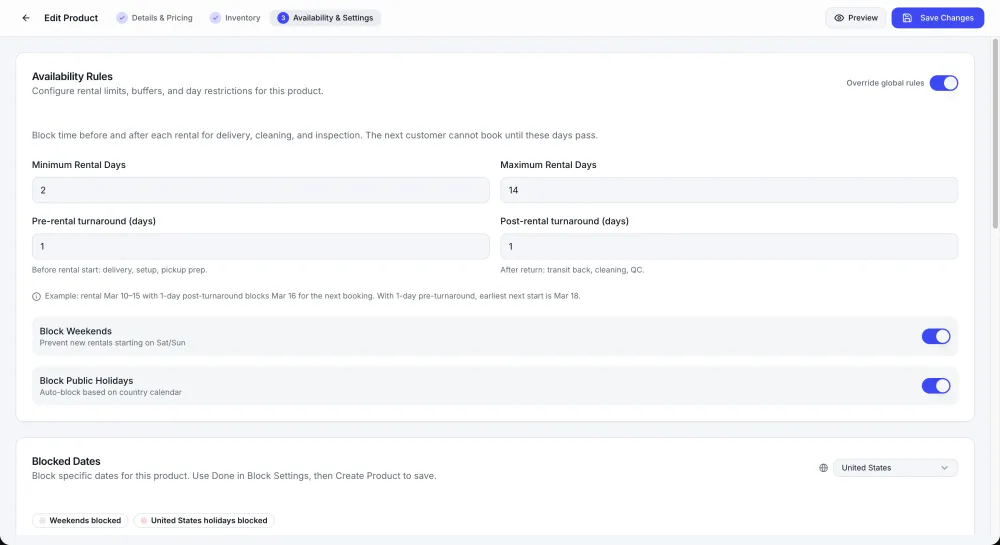
Product availability rules with the override switched on: minimum 2 rental days and maximum 14

01See it in action

See minimum rental period in the admin

A short walkthrough in the Rental Suite admin, with voiceover. It plays muted; press Play with sound to hear it from the start.

Read the setup guide

02Overview

Minimum rental period in Rental Suite

A minimum rental period is the shortest booking you'll take for an item, and the maximum is the longest. In Rental Suite you set both in whole days. Every product starts on the shop default, a category or tag rule can change it for a group, and any product can take its own.

The limits apply everywhere a booking is made: the date picker on your product page, the cart and checkout, and New Booking in the admin. Both the first and the last day count, so a rental from December 8 to December 10 is three days.

Minimum and maximum rental days for the whole shop

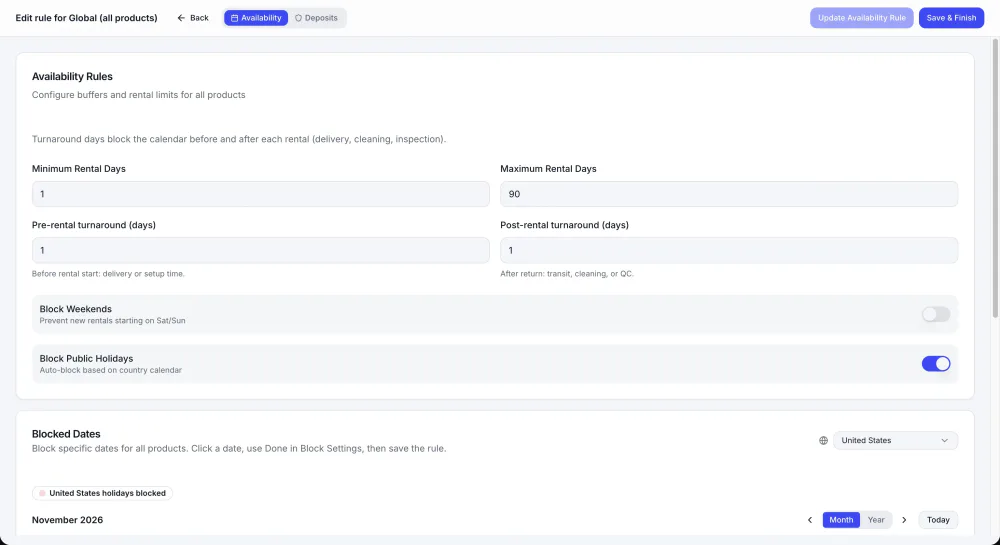
Open Settings, Rental Rules and edit the global rule. Minimum Rental Days and Maximum Rental Days apply to every product that doesn't have a rule of its own. New shops start at 1 and 90 days.

If a group of products needs different limits, add a rule for a category or a tag. A matching category or tag rule replaces the shop default for those products.
Rental Suite
Global availability rule in Settings with a 1 day minimum, a 90 day maximum and 1 turnaround day before and after each rental

Rental duration settings for one product

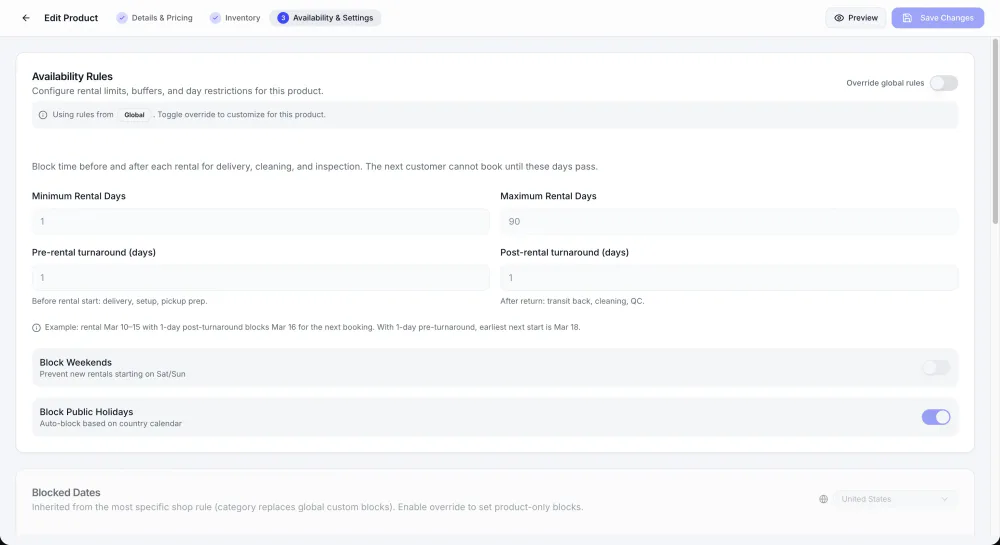
On a product's Availability & Settings tab, Rental Suite shows which rule the product uses. Switch on Override global rules to give that product its own minimum and maximum: two days for a tent that takes a day to put up, say, or fourteen days for a camera you want back every fortnight.

An override covers all of the product's availability rules, so check its turnaround and blocked dates while you're there.

Rental Suite
Product availability rules with the override switched off, showing the minimum, maximum and turnaround days taken from the shop-wide rule

What shoppers see on the product page

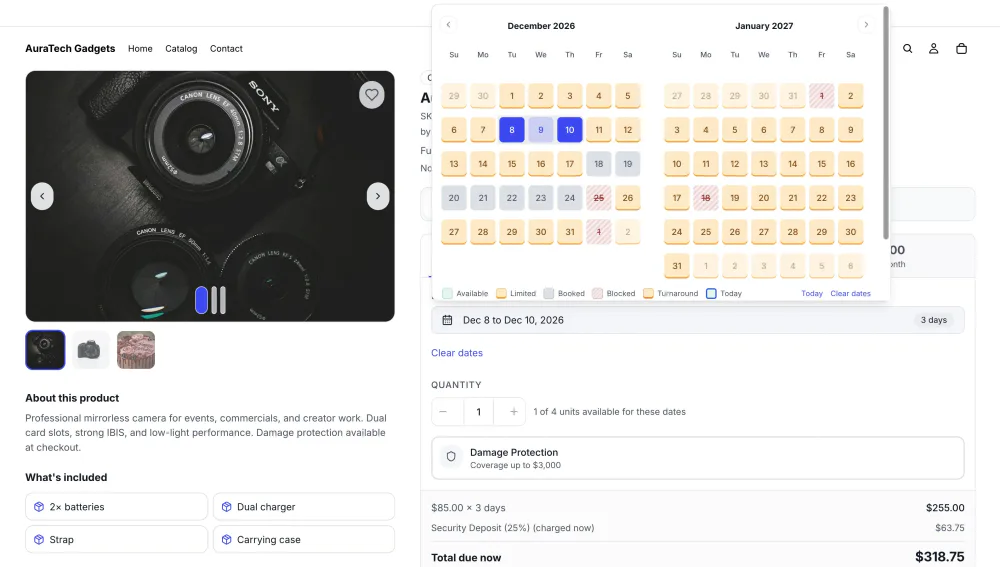
The date picker counts the days as the shopper picks and shows the count next to the range. If they drag past the maximum, it shortens the range to the longest one allowed and tells them the dates were adjusted.

A range shorter than the minimum can't go to the cart. The shopper sees a message such as "Minimum rental is 2 days." and picks a longer range.

Rental Suite
Rental date picker with December 8 to 10 selected and the range counted as 3 days

Rental booking minimum days in the admin

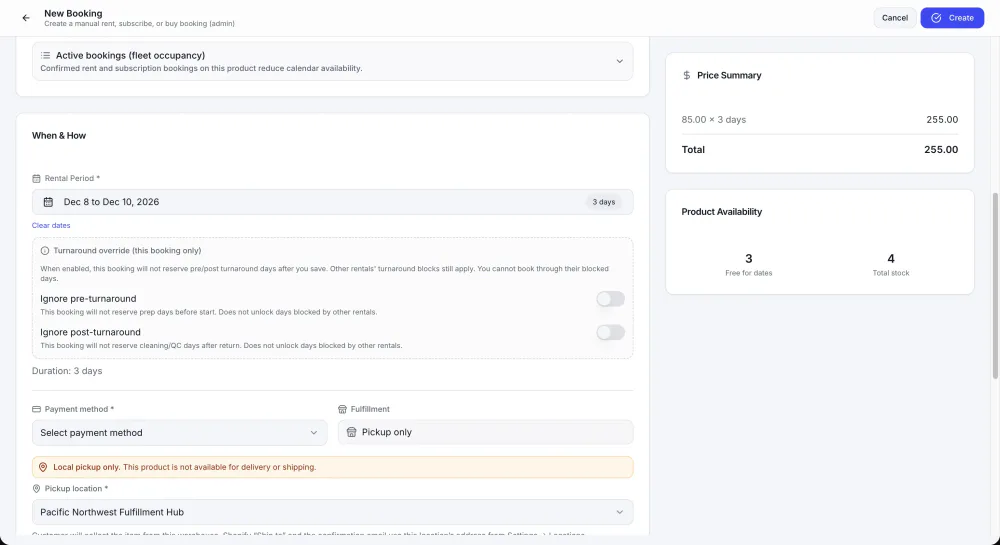
Staff creating a phone or walk-in booking in New Booking get the same check. The rental period shows its day count, the price summary multiplies the daily rate by those days, and a range outside the product's limits can't be booked.

So a customer who calls to book a tent for one night hears the same answer they'd get online, and nobody has to remember each product's limits.

Rental Suite
New Booking form with a 3 day rental period from December 8 to 10 and a price summary for 3 days

03How it works

Set up minimum rental period in 4 steps

The steps a merchant takes in the Rental Suite admin, in order.

Read the setup guide

  1. Set the shop default

    In Settings, Rental Rules, edit the global rule, enter the minimum and maximum rental days and save.

  2. Add category or tag rules

    Create a rule for a category or a tag when a group of products needs different limits from the rest.

  3. Override a single product

    On the product's Availability & Settings tab, switch on Override global rules and enter its own minimum and maximum.

  4. Test it on the product page

    Pick a range shorter than the minimum and check the message shoppers will see.

05Get started

Try minimum rental period on your store

Install Rental Suite, then turn on minimum rental period in the admin. The setup guide walks through each screen.

06FAQ

Minimum rental period questions

Answers to common questions about minimum rental period in Rental Suite.

Still have questions?

Ask the team that builds the app. We reply within one business day.

What is a minimum rental period?

A minimum rental period is the shortest booking a rental shop accepts for an item, counted in days. In Rental Suite, shoppers can't book a range shorter than the minimum set for that product.

How are rental days counted?

Both the start day and the end day count. A rental from Friday to Sunday is three days.

Can I set a maximum rental period too?

Yes. Maximum Rental Days sits next to the minimum on every rule, and the date picker won't let a range run past it.

Can each product have its own min and max rental days?

Yes. Switch on Override global rules on the product and set its own values. Products without an override use the matching category or tag rule, or else the shop default.

Can I set a minimum rental in hours?

No. Rental lengths are set in whole days, and a rental is counted by the calendar days it covers.