Availability calendar

Rental blackout dates for weekends, holidays and closed days

If you're closed on Christmas Day or don't hand out gear at weekends, shoppers shouldn't be able to book those days. Rental Suite blocks weekends, public holidays and any dates you pick, and keeps them out of every rental.

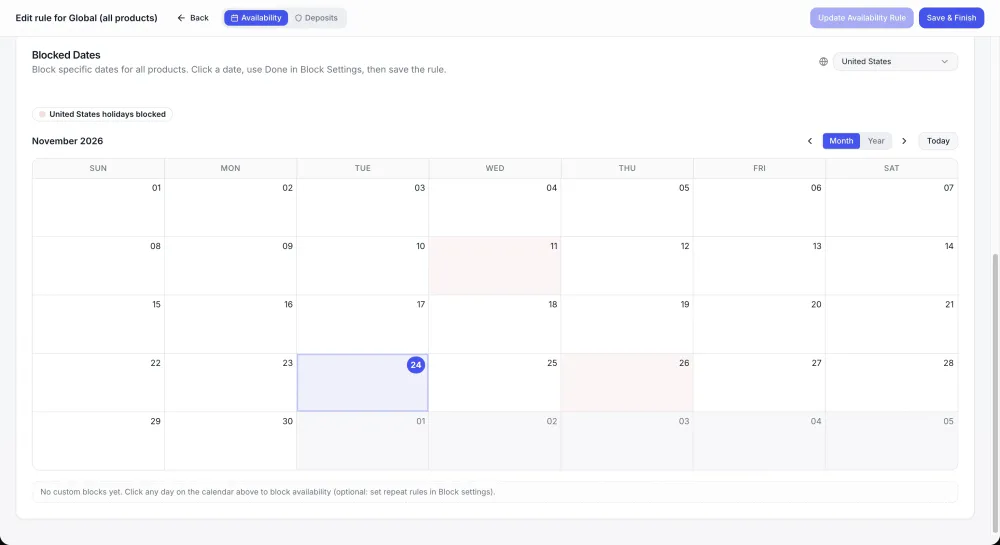
Blocked dates calendar on the global rental rule with US public holidays shaded for November 2026

01See it in action

See blackout dates in the admin

A short walkthrough in the Rental Suite admin, with voiceover. It plays muted; press Play with sound to hear it from the start.

Read the setup guide

02Overview

Blackout dates in Rental Suite

Rental blackout dates are the days a rental can't cover: when you're closed, away or busy with something else. In Rental Suite you can block every weekend, block your country's public holidays, or click days on a calendar to block them once or on a repeat.

Blocked days show as blocked in the date picker on your product page and on the admin calendar. A rental range can't include one, so shoppers pick dates on one side of it. You can set blocks for the whole shop, for a category or a tag, or for a single product.

Holiday blackout dates by country

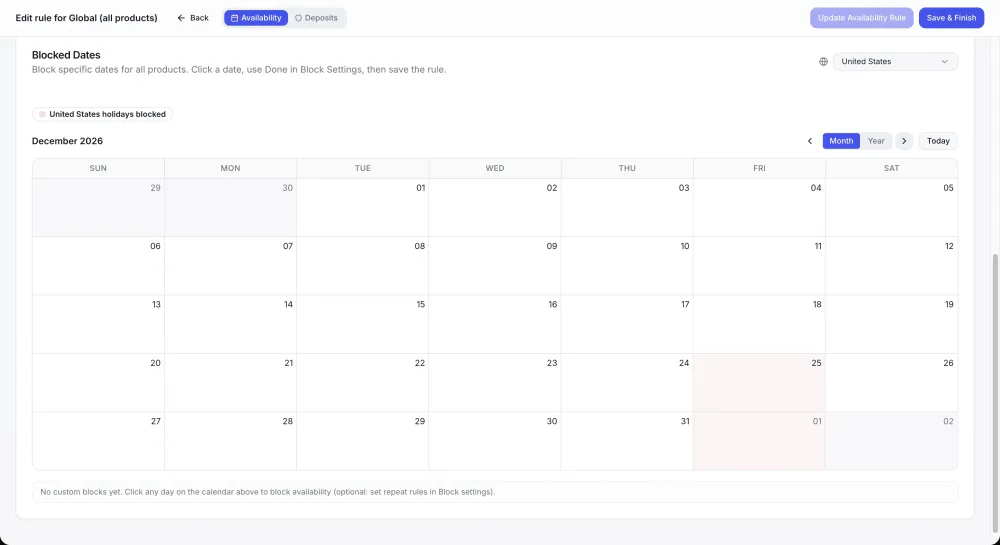
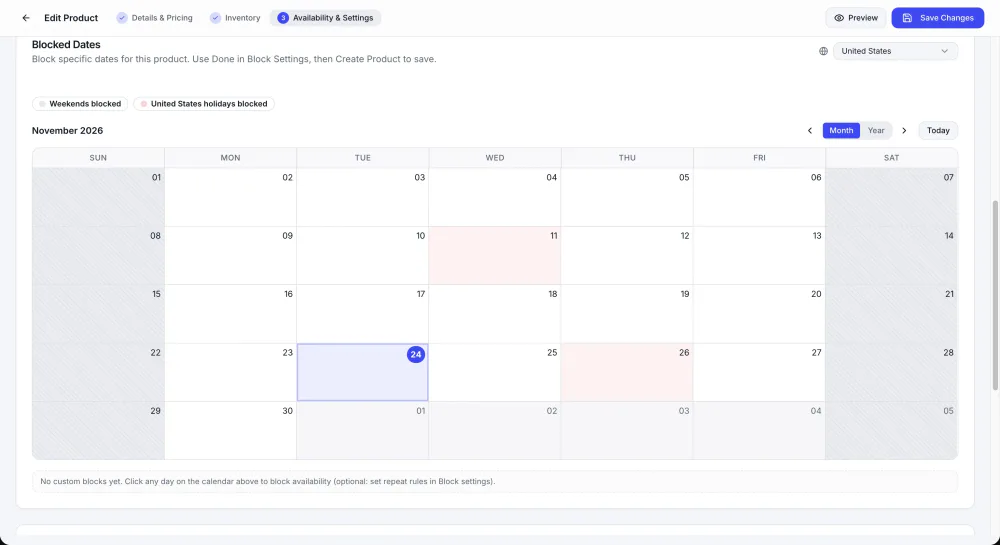
Switch on Block Public Holidays and Rental Suite blocks the public holidays of the country you pick above the calendar. It has holiday calendars for the United States, the United Kingdom, Canada, Australia, India, Germany, France, the United Arab Emirates, Saudi Arabia and Bangladesh.

Holidays are worked out for each year, so there's nothing to add again in January. New shops start with public holidays blocked; switch it off if you rent through them.
Rental Suite
Blocked dates calendar for December 2026 with Christmas Day shaded as a blocked public holiday

Block weekends from bookings

Switch on Block Weekends when you don't hand out or take back rentals on Saturdays and Sundays. Weekend days are then blocked on the calendar, and a rental range can't include them.

This blocks the whole weekend, so it suits shops that work weekdays only. You can turn it on for the whole shop, for a category or tag rule, or for one product with Override global rules, and leave it off everywhere else.

Rental Suite
Product blocked dates calendar with weekends and US public holidays shaded for November 2026

Block your own dates, once or on repeat

For closures that aren't holidays, such as a stocktake, a trade show or your own time off, click the days on the Blocked Dates calendar. Each block covers a full calendar day.

Open Block Settings on a blocked day to make it repeat every day, week, month or year, pick the weekdays for a weekly pattern, and end it on a date, after a number of times, or never. Save the rule or the product to apply it.

Blocked dates on the booking calendar

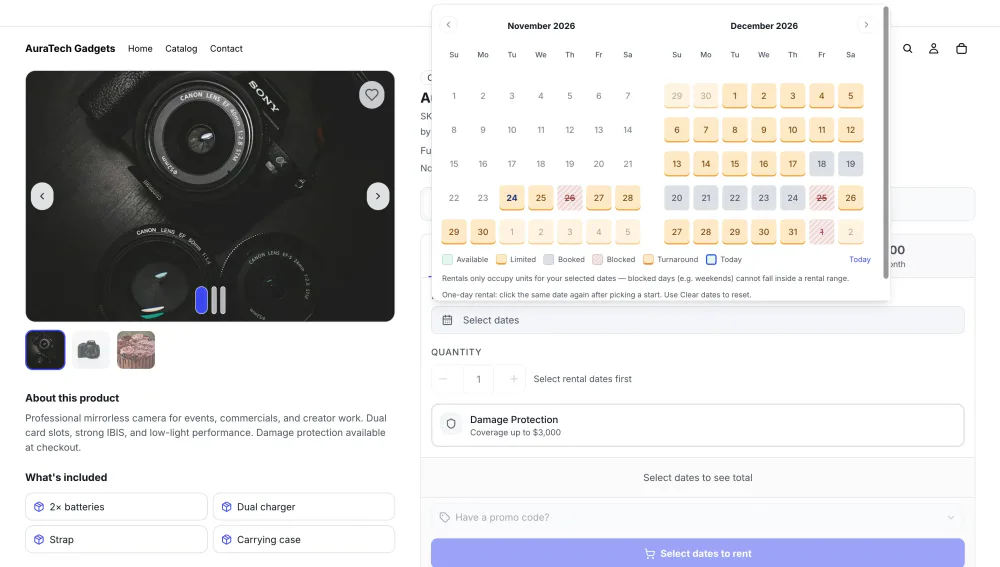
On the product page, blocked days are hatched and can't be chosen inside a range. The picker explains the rule under the calendar, and when a shopper's dates cross a blocked day it suggests shorter ranges on either side.

Staff see the same blocked days when they pick dates in New Booking.

Rental Suite
Rental date picker on a product page with public holidays hatched as blocked and a note that blocked days can't fall inside a rental range

Where a blackout date applies

Blocks on the global rule apply to every product. A category or tag rule uses its own blocked dates for that group in place of the shop's, and a product with Override global rules switched on uses only the dates set on the product.

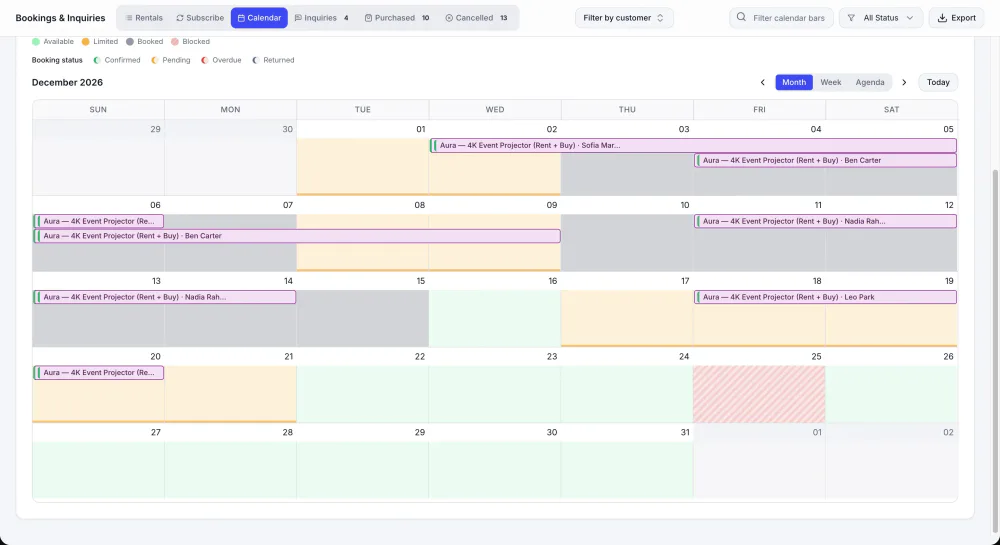
To check, open the Calendar tab in Bookings, pick a product and switch on the availability overlay: its blocked days show next to its bookings.

Rental Suite
December bookings calendar for one projector with the availability overlay: booked days in grey, limited in amber, free in green and Christmas Day blocked

03How it works

Set up blackout dates in 4 steps

The steps a merchant takes in the Rental Suite admin, in order.

Read the setup guide

  1. Pick your holiday country

    In Settings, Rental Rules, open the global rule and choose your country above the Blocked Dates calendar.

  2. Turn on weekends or holidays

    Switch Block Weekends and Block Public Holidays on or off to match the days you work.

  3. Click your own closed days

    Click days on the Blocked Dates calendar, open Block Settings to set a repeat, and press Done.

  4. Save and check the storefront

    Save the rule, then open a product page and confirm the blocked days show in the date picker.

05Get started

Try blackout dates on your store

Install Rental Suite, then turn on blackout dates in the admin. The setup guide walks through each screen.

06FAQ

Blackout dates questions

Answers to common questions about blackout dates in Rental Suite.

Still have questions?

Ask the team that builds the app. We reply within one business day.

What are blackout dates for a rental?

Blackout dates are days a rental can't cover, such as public holidays or days you're closed. In Rental Suite they show as blocked in the date picker, and a rental range can't include one.

Can I block public holidays automatically?

Yes. Switch on Block Public Holidays and pick your country. Rental Suite blocks that country's public holidays every year, with calendars for 10 countries.

Can I block weekends from bookings?

Yes. Block Weekends marks every Saturday and Sunday as blocked, so a rental range can't include them.

Can a blocked date repeat?

Yes. A blocked day can repeat daily, weekly, monthly or yearly, and stop on a date, after a number of times, or never.

Can one product have different blackout dates from the rest?

Yes. Switch on Override global rules on the product and set its own blocked dates, weekends and holidays. The product then ignores the shop-wide blocks.