Use cases

Bike rental software for day and week hires

One rider wants a medium hybrid for Saturday and a family wants four bikes for the week. Rental Suite counts each size, prices day and week hires and lets riders collect from the branch that has the bike.

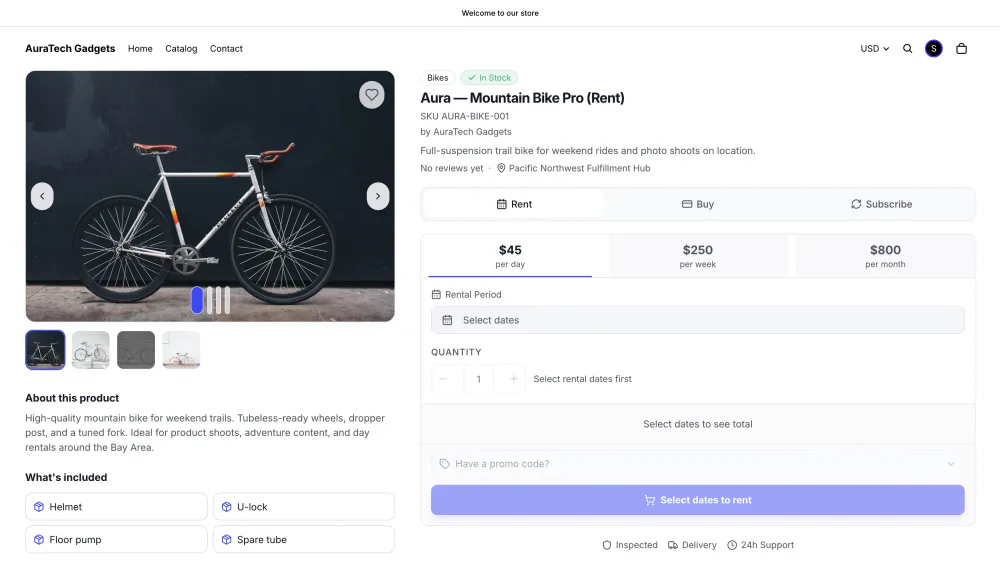
Mountain bike product page with Rent, Buy and Subscribe tabs and day, week and month rates

01See it in action

See how a bike rental shop runs in Rental Suite

A short walkthrough in the Rental Suite admin, with voiceover. It plays muted; press Play with sound to hear it from the start.

02Overview

Bike rental software that fits how you rent

A shop that hires out bikes is really hiring out sizes. Five trail bikes are no use to a tall rider when all the large frames are out. Bike rental software has to count frames by size, price a day and a week differently and know which branch the rider will collect from.

Rental Suite adds rental booking to your online store. Each bike gets a unit count, day, week and month rates, rental length limits and the pickup locations that stock it. Riders choose dates on the product page and pay at checkout, and walk-ins at the counter book from the same counts.

It works for bikes, e-bikes and kids' bikes hired by the day or longer. If most of your hires last an hour or two, read the limits further down first.

04In practice

A day in a bike rental shop

Bike rental management software that counts every size

Rental Suite holds one stock count per product, not per variant. So rather than one bike with S, M and L options, set up each size as its own rental product: a trail bike in medium with three units, the same bike in large with two. Each size then has its own date picker, its own count and, if bigger frames cost more, its own price.

Write the rider height range in each description so people choose the right frame, and give every size of a model the same category. One category rule can then set the hire length limits for the whole range.

  • One product and one unit count per frame size
  • Rider height range in the description
  • A category rule for every size of a model
Rental Suite
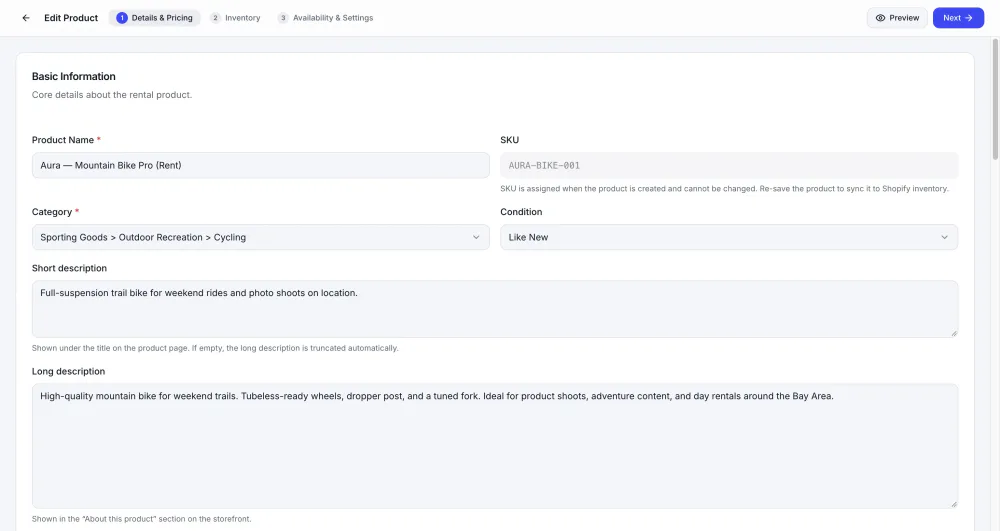
Product editor Basic Information step for a mountain bike with the name, category, condition and descriptions

Bike rental booking software with day and week rates

Each bike's Rental Pricing card takes a daily rate and, if you offer them, a weekly and a monthly rate. A five-day hire costs five days at the daily rate. From the seventh day the weekly rate takes over, split into a price per day, so an eight-day holiday hire is eight of those days rather than a week plus one day at full price.

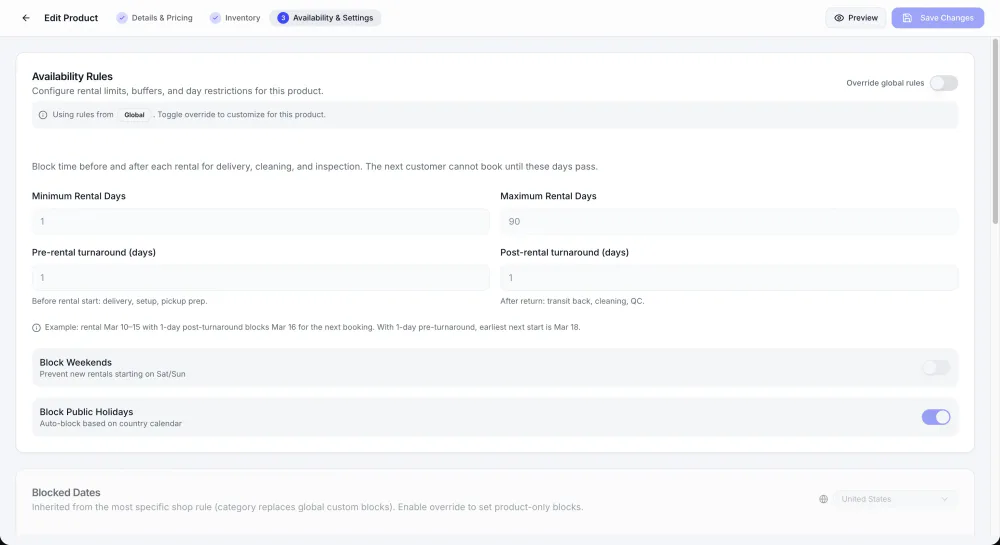
The bike's availability rules set how long a hire can run and how many days it needs afterwards for a check and a clean. Leave a bike on the shop default, or switch on the override for e-bikes that need a longer gap for charging and servicing.

Rental Suite
Product availability rules for a mountain bike showing the shop-wide minimum, maximum and turnaround days in use, with the override switch off

Damage protection for bikes and e-bikes

Turn on the damage protection add-on and riders see it as an option on the product page. Shop-wide, the fee is a share of the rental. On a single product you can set a daily fee and a coverage limit instead, which suits e-bikes, where the motor and battery are the expensive parts.

Riders who tick it pay the fee with the hire. When a bike comes back with a buckled wheel, you decide whether the protection covers it and pay for the repair yourself, so list what's covered on each bike's page before anyone rides off.

Rental Suite
Shop-wide rental rule with the damage protection add-on switched on and its rate set as a percent of the rental

Pickup locations for shops with more than one branch

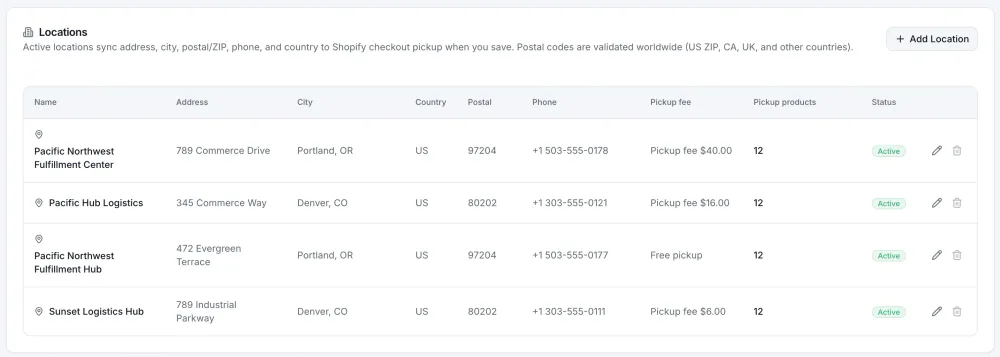
Add each branch once in Settings, Locations, with its address, phone and an optional pickup fee. On each bike, choose the branches that stock it, and checkout offers pickup only at those places, so nobody books the beach branch's tandem for collection in town.

Turn off delivery on a bike and it becomes pickup only. Counter staff who choose Pickup in New Booking pick the branch too, and the confirmation email gives the rider that address. A pickup fee is added to bookings made in the admin; charging it at online checkout works only on Shopify Plus stores.

Rental Suite
Locations table in Settings with four pickup locations, their addresses, phone numbers, pickup fees and active status

What Rental Suite doesn't do for bike hire

Hires are whole days. There's no hourly or two-hour price, so a morning ride is sold as a day, and a beach shop that lives on hourly cruisers will find that limiting. Stock is counted per product, which is why each size needs its own.

It doesn't track bikes by GPS, collect signed waivers, check IDs or charge extra when a bike is late. Delivery to a hotel uses your store's own shipping rates, and planning the van run stays with you.

06How it works

Set up a bike rental shop in 5 steps

The order most shops follow in the Rental Suite admin.

  1. Add a product per size

    Create each model and frame size as a rental product and enter how many of that size you own.

  2. Set day and week rates

    Enter the daily rate, a weekly rate for holiday hires and a monthly rate if you rent to commuters.

  3. Add your branches

    Add each pickup location in Settings, then choose the branches that stock each bike.

  4. Offer protection and a deposit

    Switch on damage protection with a coverage limit and set a deposit on the e-bikes.

  5. Hand over the bikes

    Riders book online or at the counter; mark each hire returned when the bike is back so it's free for the next rider.

08Get started

Put every frame size online

Install Rental Suite, add a product for each size you hire out and take your next booking from the product page.

09FAQ

Bike rental software questions

Still have questions?

Ask the team that builds the app. We reply within one business day.

What is bike rental software?

Bike rental software tracks which bikes are free on which dates, prices each hire and takes the booking and payment. Rental Suite does this in your online store, with a unit count per size, day and week rates and pickup locations.

How do I start a bike rental business?

Start with the bikes and sizes people ask for most, decide your day and week prices, and choose how riders collect and return them. Then put each size online with a date picker so riders can book and pay without calling, which is the part Rental Suite adds to your store.

Can bike sizes be variants of one product?

Not for rental stock. Rental Suite keeps one unit count per product, so S, M and L variants would share a single count. Set up each size as its own product instead.

Does Rental Suite handle hourly bike hire?

No. The shortest hire is one calendar day, so if most of your rides last an hour or two it isn't a good fit.

Can a rider keep a bike for a month?

Yes. Give the bike a monthly rate, which applies from 30 days, and raise its maximum rental length if it's lower. For commuters who want a bike on an ongoing basis, Subscribe bills weekly, bi-weekly, monthly or quarterly on the Standard plan and up.

Can riders pick which branch to collect from?

Yes, from the branches you've chosen on that bike. Checkout only offers those pickup locations, and the booking keeps the one the rider picked.