Use cases

Camera rental software for bodies, lenses and kits

A body worth thousands goes out for a weekend shoot. Rental Suite tracks each body and lens by serial number, adds a deposit sized to the gear and prices the rental by the day or week.

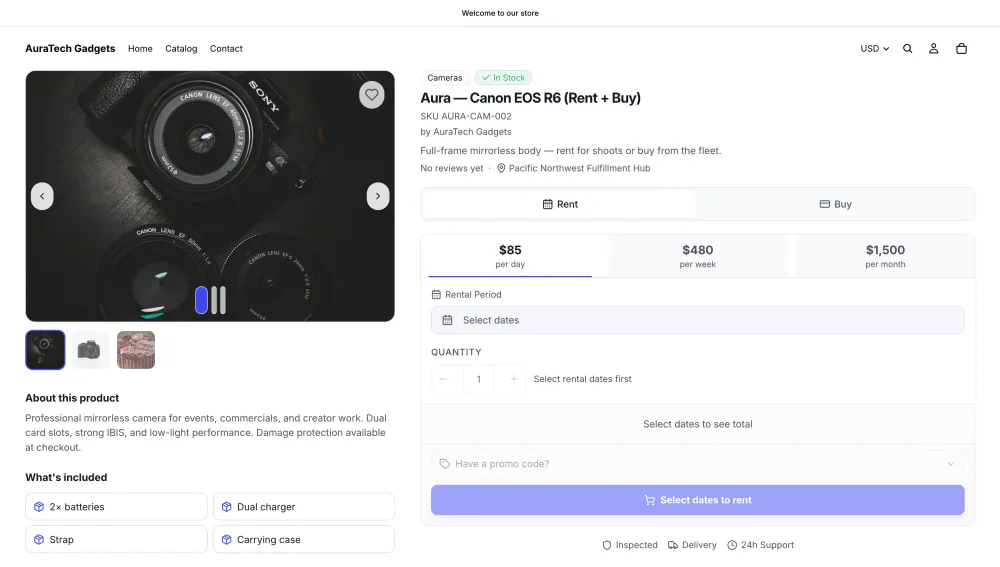
Camera product page with Rent and Buy tabs, day, week and month rates and the rental period field

01See it in action

See how a camera rental shop runs in Rental Suite

A short walkthrough in the Rental Suite admin, with voiceover. It plays muted; press Play with sound to hear it from the start.

02Overview

Camera rental software that fits how you rent

Renting out cameras means handing a stranger something expensive. A camera rental business usually runs on a few bodies, a shelf of lenses and the small things that make them usable: batteries, cards, a cage, a cable. Camera rental software has to know which serial number each renter took, what was in the bag and how much money sits against it.

Rental Suite sits inside your online store. Each body, lens or kit is a product with its own unit count, day, week and month rates, a deposit and optional damage protection. Renters pick dates on the product page and see the whole total before checkout, and bookings you take by phone come out of the same stock.

It suits shops renting stills and video gear by the day or longer. Studio time sold by the hour isn't covered.

04In practice

A day in a camera rental shop

Camera rental software for bodies, lenses and ready-made kits

Set up each body and each lens as its own product and give it Total Units. A renter who wants a body and a standard zoom books both, and each comes out of its own count, so you can still rent the lens alone to someone who owns the body.

For a kit that goes out as a set, such as a body with a kit lens, two batteries and a card, make the kit its own product with its own count and price, and list everything in the bag under What's included. Rental Suite doesn't link one product's stock to another's, so a body you keep in a kit shouldn't also be counted as a single body.

  • One product per body, lens or fixed kit
  • A What's included list on each product page
  • Each product keeps its own unit count
Rental Suite
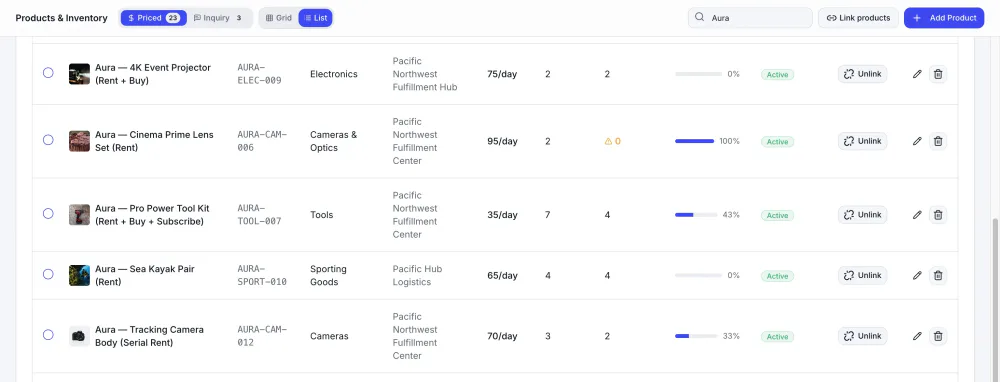
Products and Inventory list with total units, units available and utilization bars for a projector, a lens set, a tool kit, a kayak pair and a camera body

How to rent out camera equipment by serial number

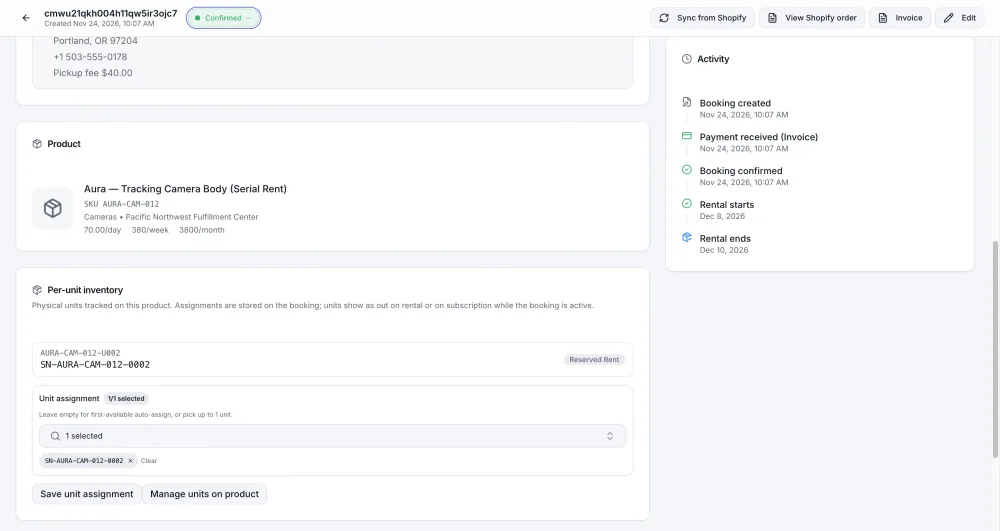
Turn on per-unit tracking for the gear you need to tell apart. Each unit gets a unit ID, the serial printed on the body or lens, a condition and notes, so the scratch on body two's rear screen is written down before it goes out again.

On the booking, the Per-unit inventory card shows which unit is assigned. Let Rental Suite pick the first free one, or choose the exact serial you're handing across the counter. The activity timeline below keeps the record, so a question about a dent three weeks later starts from what was written at the time.

Rental Suite
Booking detail with the Per-unit inventory card showing the assigned serial unit, the unit assignment control and the booking activity timeline

Deposits and damage protection on high-value gear

Set a shop-wide deposit as a share of the rental with a maximum, then raise it on the products that need more. A full-frame body might carry 25 percent of the rental capped at $500, while a filter carries nothing. A fixed amount works too, when you'd rather hold the same sum on every rental of that item.

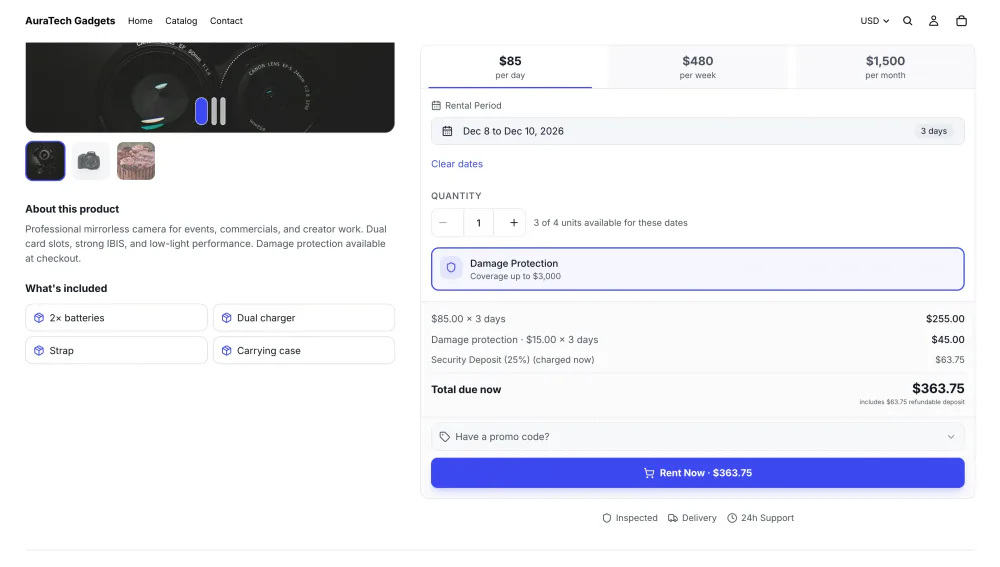
Damage protection is a separate, optional line: a daily fee per unit up to the most you'll cover, which renters tick on the product page. It's your own promise rather than a policy, so say on the page what it covers, such as a cracked filter, and what it doesn't, such as water damage. The deposit goes back in full when you mark the booking returned.

Rental Suite
Camera product page total with damage protection at 15 dollars a day and a refundable security deposit added to the rental

Photography equipment rental booking on one calendar

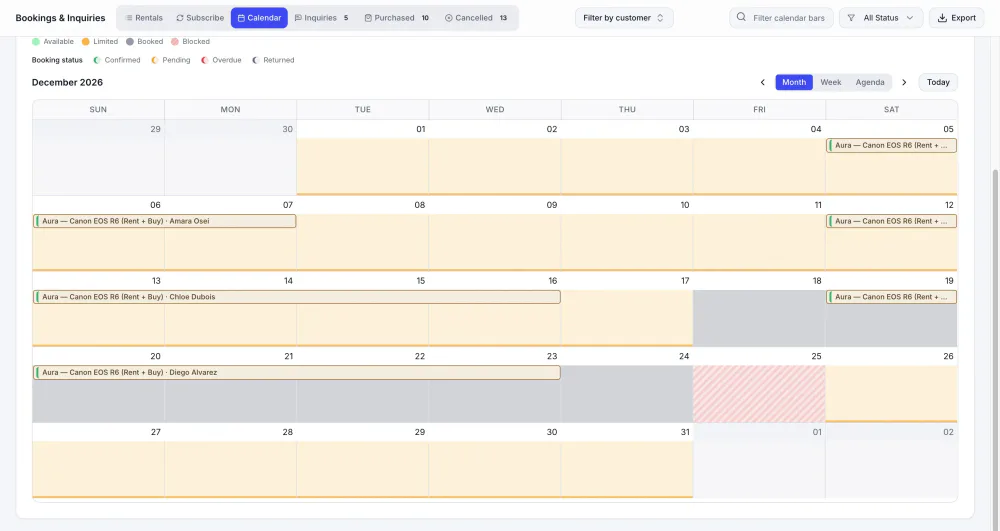
The Calendar tab in Bookings shows each renter as a bar across their dates. Pick one camera and switch on the availability overlay, and the days take colour: amber when only some bodies are left, grey when all are out, and blocked days marked. A crowded weekend shows up before the fourth person asks for it.

Bookings can start today or up to a year ahead, so a wedding photographer can hold two bodies for June while it's still winter. Days count in whole calendar days: a Friday pickup with a Monday return is four days.

Rental Suite
Bookings calendar for one camera with a booking bar for each of four renters and day colours for limited, booked and blocked days

Where Rental Suite stops for camera shops

There's no hourly pricing, so a two-hour product shoot is sold as a full day. Each booking holds one product, so a body plus three lenses is four bookings, or one kit product you set up in advance. Rental Suite doesn't check IDs, collect signed rental agreements, track gear by GPS or add a charge when a lens comes back late.

It also can't keep part of a deposit. Marking a rental returned refunds the whole amount, so a repair bill is something you settle with the renter yourself.

06How it works

Set up a camera rental shop in 5 steps

The order most shops follow in the Rental Suite admin.

  1. List bodies, lenses and kits

    Link each body, lens and fixed kit as a rental product and set how many units of each you own.

  2. Track the serials

    Switch on per-unit tracking and enter the serial and condition of every body and lens.

  3. Price by the day and week

    Enter a daily rate, a weekly rate for longer shoots and a monthly rate if productions keep gear for weeks.

  4. Set deposits and protection

    Override the shop deposit on high-value bodies and set a daily damage protection fee with a coverage limit.

  5. Hand over and check in

    Assign the exact unit at pickup, check the kit list when it comes back and mark the booking Returned to refund the deposit.

08Get started

Know which camera every renter has

Install Rental Suite, add your first body with its serial numbers and take a booking from the product page.

09FAQ

Camera rental software questions

Still have questions?

Ask the team that builds the app. We reply within one business day.

What is camera rental software?

Camera rental software tracks which bodies, lenses and accessories are free on each date, prices the rental and takes payment and a deposit. Rental Suite does this inside your online store, with a serial number for each unit you track.

How do I start a camera rental business?

Start with a couple of popular bodies and the lenses people ask for, priced by the day with a weekly rate, and decide on a deposit before the first rental. Each item then needs a product page where renters pick dates and pay, which is the part Rental Suite adds to your store.

Can renters book a camera body and lenses together?

Yes, in one checkout, but each product becomes its own booking with its own dates and units. If a body and lens usually go out together, set the pair up as one kit product.

Can I hold a bigger deposit on expensive lenses?

Yes. Switch on Override settings on the lens and give it its own percentage and maximum, or a fixed amount. Products you leave alone use the shop-wide deposit.

Who pays for repairs under damage protection?

You do. Damage protection is a fee you charge the renter and a promise you keep yourself, up to the coverage limit you set, so price it against what a typical repair costs you.

Can I limit how long a camera stays out?

Yes. Set a maximum rental length in days on the product, and the date picker shortens any longer range to the most you allow. Add a minimum too if a one-day rental isn't worth the prep.