Use cases

Event rental software for AV gear and quoted events

Event customers rarely want a price tag; they want a quote for their date and guest count. Rental Suite puts a request form on your event gear, turns the yes into a booking at your rate and prints the invoice.

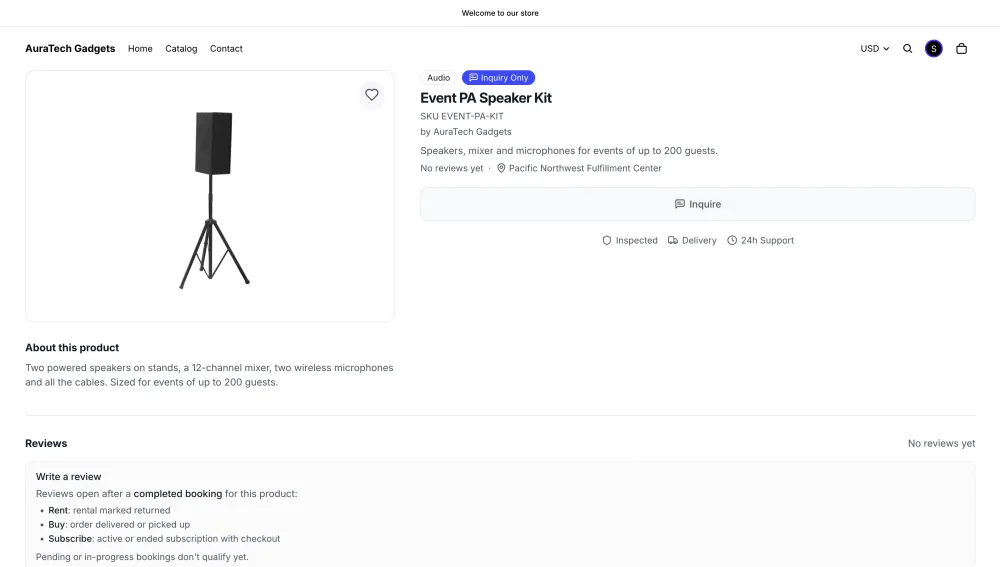
Event PA speaker kit product page marked Inquiry Only, with an Inquire button in place of the price and checkout

01See it in action

See how an event rental shop runs in Rental Suite

A short walkthrough in the Rental Suite admin, with voiceover. It plays muted; press Play with sound to hear it from the start.

02Overview

Event rental software that fits how you rent

Event rental runs on conversations. A planner wants a PA system for 200 guests, a projector and screen for a keynote, or lighting for a wedding in June, and needs a price before anything is booked. Event rental software has to collect those details, show what's free on the date and turn the agreed quote into a booking with the right gear on the right day.

Rental Suite adds this to your online store. Products you'd rather quote than price show a request form instead of a checkout button. The request lands in your admin with the dates, units and answers, and once the customer agrees, you create the booking at the daily rate you quoted.

Items you're happy to price, like a single speaker or a mic stand, can still be booked and paid for online beside them.

04In practice

A day in an event rental shop

Event rental inventory software with a quote form on the product

Switch a product to Inquiry to Rent and its page shows an Inquire button instead of a price and checkout. The form asks for the rental period, using your availability calendar so blocked and booked days can't be requested, the number of units and whatever else you need to price the job.

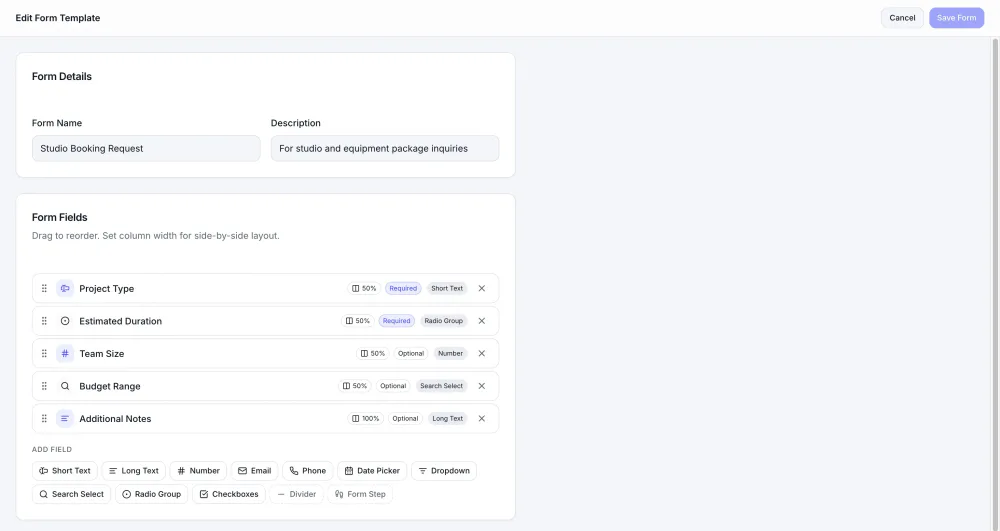
Build the form from short and long text, numbers, dropdowns, radio groups, checkboxes and date fields, then save it as a template and reuse it. A wedding package and a conference AV kit can ask different questions.

  • Rental period picker that respects your calendar
  • Your own fields: guest count, venue, power, setup time
  • A saved template for each kind of event
Rental Suite
Inquiry form template editor with the form name, description and a list of fields, each with its width, required switch and field type

Event rental management software for requests and replies

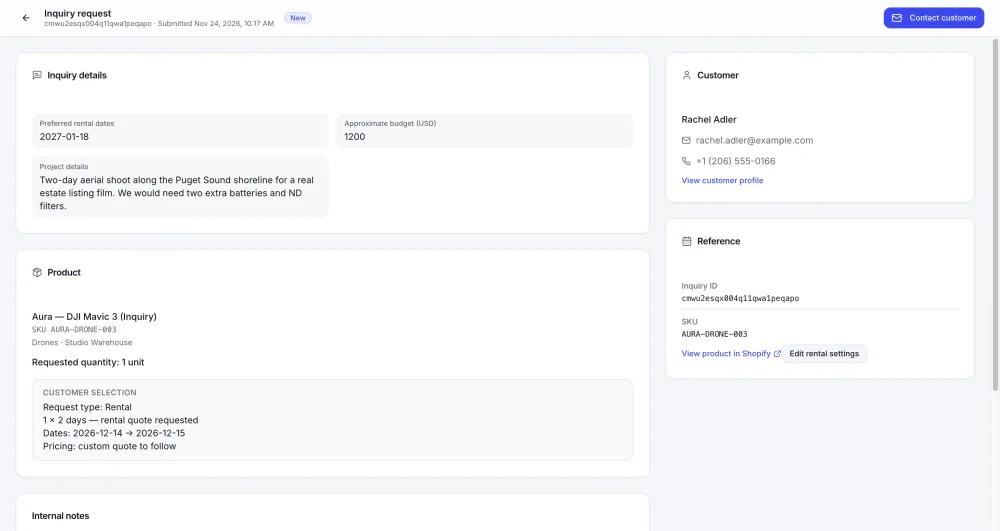
Requests land on the Inquiries tab in Bookings with the customer, product, preferred dates and the answers to your questions. Open one to read everything, pick or create the customer record and add internal notes for whoever prices the job.

Contact customer opens a draft email in Gmail and moves the request to Contacted. Your team also gets a New inquiry request alert in the notifications feed, so a Friday night request doesn't sit unseen until Monday.

Rental Suite
Inquiry request detail with the customer, preferred dates, budget, project details, the requested product and quantity, and the customer selection

From agreed quote to confirmed booking

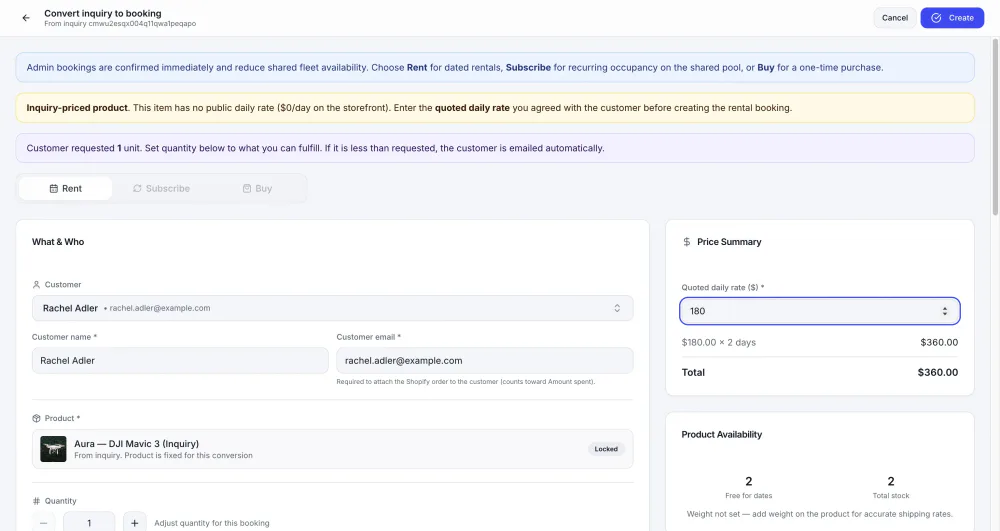
Once a request is Contacted, Create booking opens a booking form with the customer, product and quantity filled in. Type the daily rate you quoted, check the dates, choose payment and pickup or delivery, and the price summary shows the rate times the days and units before you click Create.

The booking is confirmed straight away, takes its units for those dates and creates an order in your store. A deposit, damage protection or a pickup fee is added on top, as on any booking.

Rental Suite
Convert inquiry to booking form with a 180 dollar quoted daily rate and a price summary of 2 days and a 360 dollar total

Invoices for weddings, conferences and private events

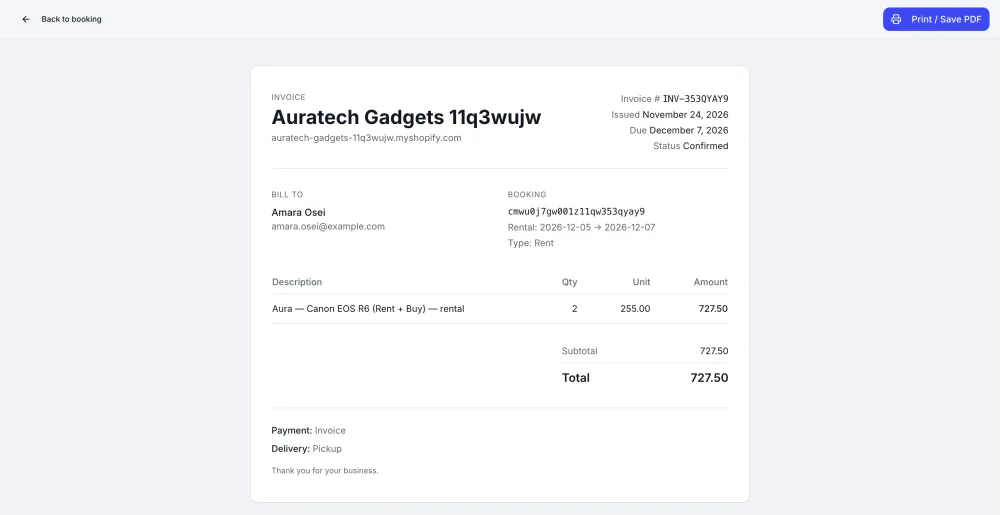
Bookings you create in the admin, converted quotes included, get a printable invoice with the bill-to customer, rental dates, the line item and the total, plus a Print or Save PDF button. Send it to the planner or the venue.

It's a plain invoice for now: one total line, with any deposit and damage protection inside it, your store name at the top and no logo or tax lines.

Rental Suite
Booking invoice with the bill-to customer, rental dates, a line item, subtotal and total, and a Print or Save PDF button

What Rental Suite doesn't do for event rentals

Each request and each booking covers one product. A quote for a PA kit, two projectors and stage lighting becomes one booking per product, and there's no package price across them. If you always rent things together, set the set up as one product, the way the PA kit above includes speakers, mixer and microphones.

A quote request doesn't reserve gear; only a booking does, so check the calendar before you send a price. Rental Suite also doesn't schedule crews or delivery runs, build floor plans, sync with Google Calendar, collect signed contracts or charge late fees.

06How it works

Set up an event rental shop in 5 steps

The order most shops follow in the Rental Suite admin.

  1. Decide what to quote and what to price

    Set large or variable items to Inquiry to Rent and keep a daily rate on the small items customers can book themselves.

  2. Build your request form

    Create a template with the questions you need to quote, such as guest count, venue and setup time, and attach it to each quoted product.

  3. Turn on the alerts

    Keep the New booking alert on so your team sees new requests, and switch on the Inquiry Received email if customers should get one.

  4. Reply and convert

    Contact the customer, agree the price, then create the booking from the request at your quoted daily rate.

  5. Invoice and hand over

    Print the invoice from the booking, mark the handoff on the order and mark the booking returned after the event.

08Get started

Quote your next event from the product page

Install Rental Suite, set your event gear to quote requests and answer the first one from your admin.

09FAQ

Event rental software questions

Still have questions?

Ask the team that builds the app. We reply within one business day.

What is event rental software?

Event rental software manages the gear you rent out for events: what's free on each date, quotes, bookings and returns. Rental Suite does this in your online store, with quote requests for gear you price per event.

Can customers request a quote instead of booking online?

Yes. Set a product to Inquiry to Rent and its page shows a request form instead of checkout. Quote requests are on the Standard plan and up, with a 14-day free trial.

Can I use Rental Suite as wedding rental software?

Yes, for the rental side: quote forms, bookings up to 365 days ahead, deposits and invoices. It doesn't plan floor layouts, seating or vendor schedules.

Is Rental Suite AV equipment rental software?

It works for AV gear rented by the day, such as speakers, mixers, projectors and lighting. Each item has a unit count, optional serial numbers and either a quote form or a day rate.

Can one quote cover several items?

Not as one booking. Each request and booking holds one product, so a multi-item event becomes several bookings. Gear you always rent together can be set up as one product, like a PA kit.

Does a quote request hold the dates?

No. Only bookings take stock. A product set to Inquiry to Rent can't be booked online, so its dates fill only when you create bookings.