Inquiries and quotes

A rental inquiry form for gear you price by hand

Some rentals can't have a price tag: a drone with a pilot, a wedding package, a week of event gear. Rental Suite swaps the checkout for a rental inquiry form on those products, with the dates, units and questions you need to quote.

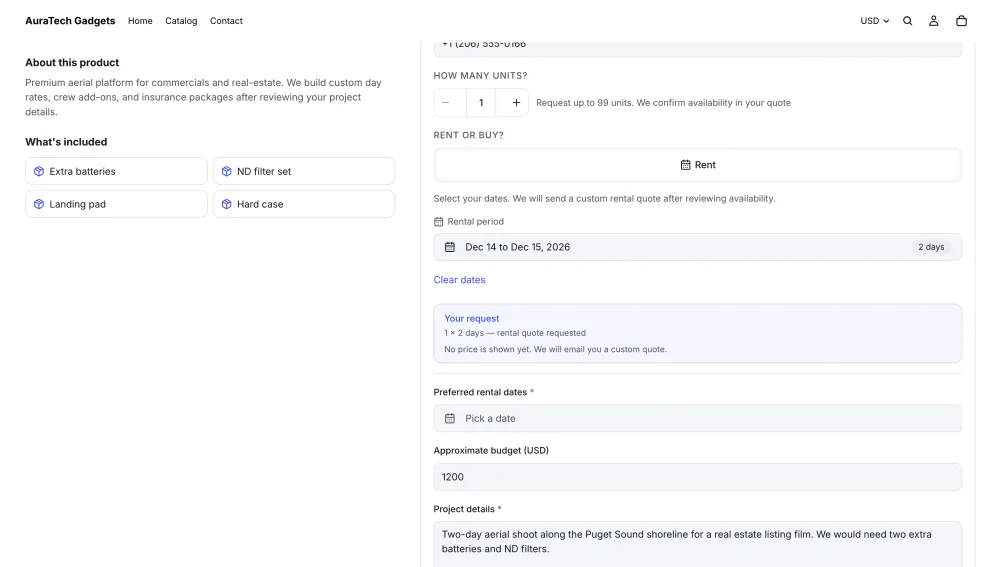
Quote request form on a drone product page with one unit, a two day rental period, a preferred date, a budget and project details filled in

01See it in action

See rental inquiry form in the admin

A short walkthrough in the Rental Suite admin, with voiceover. It plays muted; press Play with sound to hear it from the start.

Read the setup guide

02Overview

Rental inquiry form in Rental Suite

A rental inquiry form lets a shopper ask for a price instead of paying at checkout. In Rental Suite you set a product's pricing to Inquiry to Rent, and its product page shows an Inquire tab with a Request a Quote form in place of the rent, buy and subscribe options.

Every form asks for a name, email, phone, the number of units and the rental dates, checked against your availability calendar. You add your own questions, such as budget, event type or delivery address, from reusable form templates.

Requests land on the Inquiries tab in the app, where you reply and turn the agreed quote into a booking.

What every rental inquiry form asks

You don't have to build the basics. Each form starts with the shopper's name, email and phone, and How many units?, up to 99 per request. The shopper picks a Rental period in the same date picker as your other rentals, so they can't ask for days you've blocked.

Under the dates, a Your request box sums it up, such as 1 × 2 days, rental quote requested. If the product has rates, it shows an estimate; if not, it says no price is shown yet and that you'll email a custom quote.

  • Name, email and phone
  • Units, up to 99 per request
  • Rental dates from your availability calendar
  • A summary of the request before it's sent
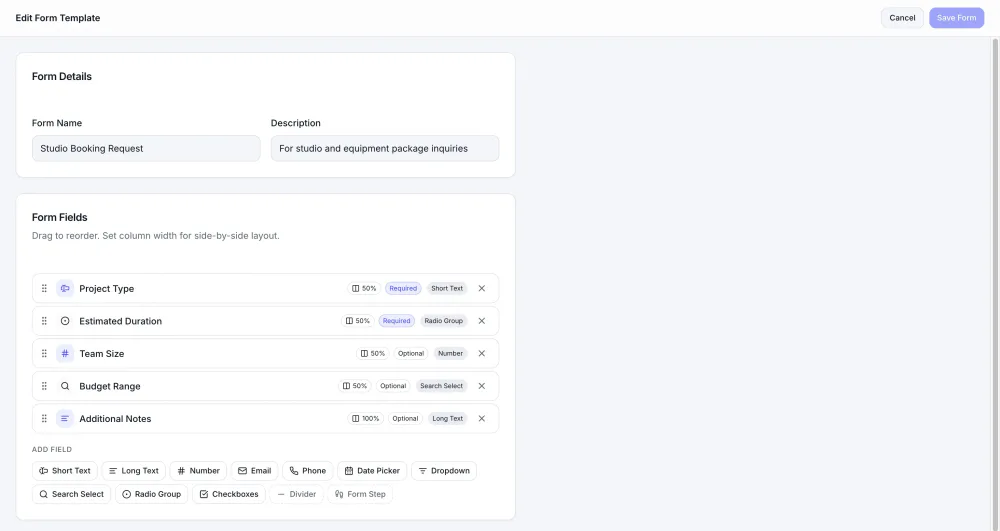
Add your own questions with form templates

In Settings › Inquiry Forms, a form template is a list of fields you choose. Drag them into order, mark each one required or optional, and set it to half or full width so short fields sit side by side.

Add a Form Step to split a long form into titled parts, and a Divider to separate groups of questions.

  • Short and long text, number, email and phone
  • Date picker, dropdown and search select
  • Radio group and checkboxes
  • Form steps and dividers for longer forms
Rental Suite
Form template editor with five fields, each with its width, required or optional flag and field type, and the buttons to add more fields

One request a quote form per kind of job

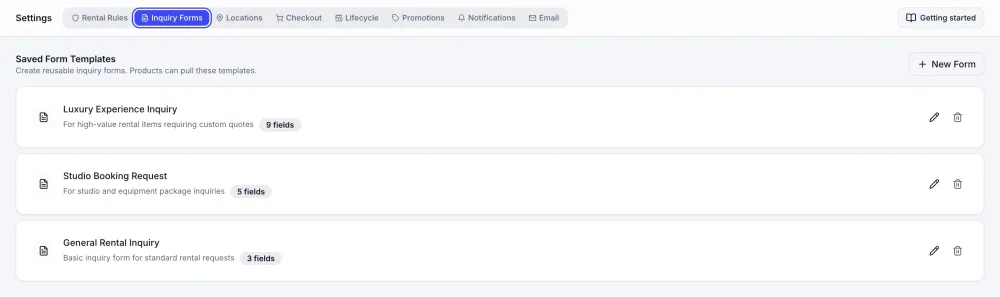
Templates are saved once and reused. Keep a short general form for most gear and a longer one for packages that need project details. On each product set to Inquiry to Rent, pick a template or start a form from scratch that belongs to that product only.

Changing a template later doesn't touch products that already copied its fields, so a form you've tuned for one product stays as it is.

Rental Suite
Saved inquiry form templates in Settings with three forms and the number of fields in each

What the shopper sees after sending

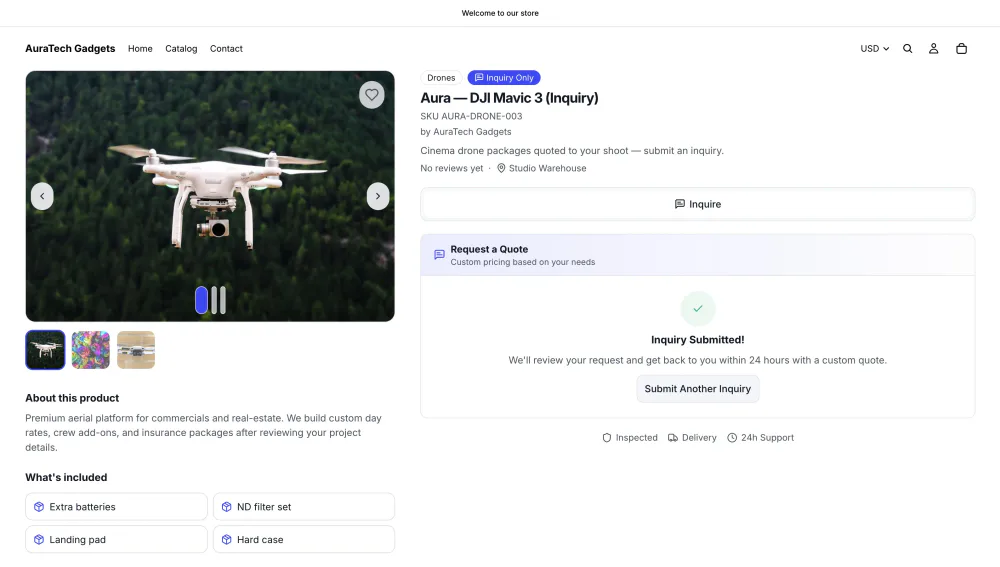
When the shopper sends the form, the card on the product page changes to a confirmation with a Submit Another Inquiry button. Nothing is charged and no units are held: a request is a question, not a booking.

If you want them to get an email too, turn on the Inquiry Received template in Email Templates. It's off until you do.

Rental Suite
Drone product page with the Inquire tab and the Inquiry Submitted confirmation in the Request a Quote card

Every answer lands on the Inquiries tab

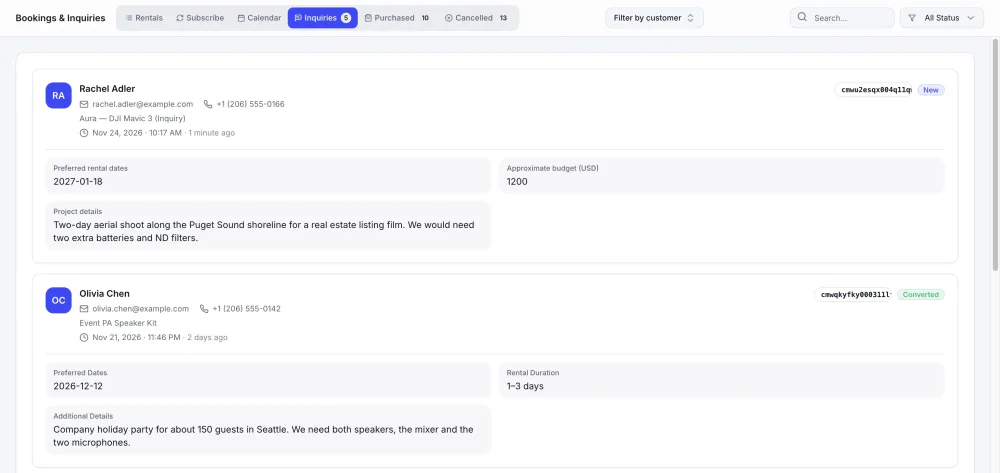
Requests go to Bookings › Inquiries with the customer, product, submit time, status and every answer on the card. Your team gets a New inquiry request alert in the app's notification feed.

Open a request to see what the shopper picked, add internal notes and contact them. From there, quote to booking covers the rest.

Rental Suite
Inquiries tab with two requests showing the customer, product, preferred dates, budget, project details and New or Converted status

03How it works

Set up rental inquiry form in 4 steps

The steps a merchant takes in the Rental Suite admin, in order.

Read the setup guide

  1. Build a form template

    In Settings › Inquiry Forms, click New Form, name it and add the fields you need.

  2. Switch the product to inquiry

    Open the product in Rental Suite and choose Inquiry to Rent under pricing.

  3. Pick the form

    Choose your template for this product, or start one from scratch, then save.

  4. Check the product page

    Use Preview to see the Inquire tab, then watch Bookings › Inquiries for requests.

05Get started

Try rental inquiry form on your store

Install Rental Suite, then turn on rental inquiry form in the admin. The setup guide walks through each screen.

06FAQ

Rental inquiry form questions

Answers to common questions about rental inquiry form in Rental Suite.

Still have questions?

Ask the team that builds the app. We reply within one business day.

What is a rental inquiry form?

It's a form on a rental product page that asks for a quote instead of taking payment. The shopper sends dates, units and answers, and you reply with a price.

What fields can I add to the form?

Short and long text, number, email, phone, date picker, dropdown, search select, radio group and checkboxes, plus form steps and dividers to lay it out.

Can shoppers pick rental dates on the form?

Yes. Every form has a rental period picker that uses your availability calendar, so blocked and booked days can't be requested.

Do shoppers get a confirmation?

They see a confirmation on the product page right away. A confirmation email goes out only if you turn on the Inquiry Received template.

Can different products use different forms?

Yes. Pick a saved template on each product, or give a product its own form built from scratch.

Which plans include the inquiry form?

Standard, Growth and Enterprise, with a 14-day free trial. On the Free plan, quote-only products show "Contact the store for a quote" instead of the form.