Customers and analytics

Repeat customer rate and lifetime value for your rental shop

Finding a new renter takes ads, listings and time, so it helps to know how many come back. Rental Suite shows your repeat customer rate, rentals per customer and top customers by lifetime value, worked out from the bookings in your shop.

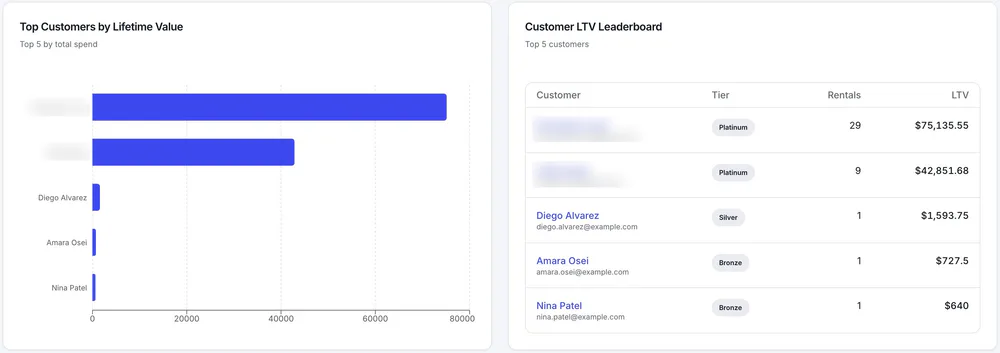
Bar chart of the top five customers by lifetime value beside a leaderboard with each customer's tier, rentals and lifetime value

01See it in action

See repeat customer rate in the admin

A short walkthrough in the Rental Suite admin, with voiceover. It plays muted; press Play with sound to hear it from the start.

Read the setup guide

02Overview

Repeat customer rate in Rental Suite

Your repeat customer rate is the share of customers who have booked with you more than once. Rental Suite works it out from every customer with at least one booking and shows it at the top of the dashboard's Analytics tab, with the counts behind it.

Next to it sit the average rentals per customer, your top five customers by lifetime value, and a month-1 retention chart for each recent month of new renters. Click a name in the leaderboard to open that renter's profile.

The numbers come from bookings already in the app, so there's no report to build and nothing to export first. They describe what has happened in your shop; they don't forecast it.

How the repeat customer rate is counted

Repeat Customer Rate divides the customers with two or more bookings by the customers with at least one, and shows both counts under the figure. Avg. Rentals per Customer divides all bookings by the same group of customers.

A booking here means a rental, purchase or subscription made through Rental Suite. Quote requests don't count. Cancelled bookings stay in the count, so a renter who booked twice and cancelled once still shows as a repeat customer.

Rental Suite
Analytics tab cards for repeat customer rate, with the customers who rented twice or more, and average rentals per customer

Customer lifetime value for rental customers

Lifetime value in Rental Suite is what a customer has spent with you so far: the total of their linked orders, or of their bookings that weren't cancelled when no order is linked yet.

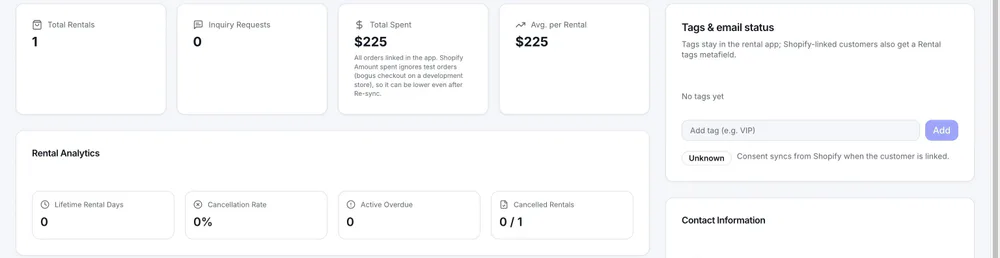
Top Customers by Lifetime Value charts your five biggest spenders, and the Customer LTV Leaderboard lists the same five with their tier, number of rentals and lifetime value. Each name opens the customer's profile, where Total Spent and Avg. per Rental sit at the top next to their rental analytics. Tiers follow total spend, from Bronze up to Platinum.

Rental Suite
Top of a customer profile with total rentals, inquiry requests, total spent, average per rental and rental analytics

Repeat customers by month: month-1 retention

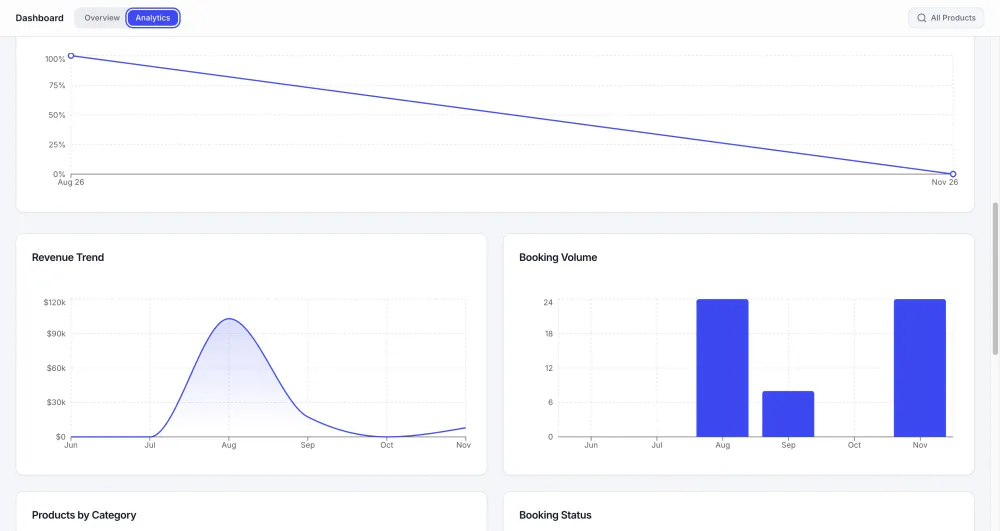
The Month-1 retention by cohort chart groups renters by the month of their first booking. For each month it shows the share who booked again in the following calendar month; hover a point to see how many returned out of how many new renters.

It covers cohorts from the last six months. A month with a dip next to steady ones is worth a look: check which products those renters booked and whether anything changed, such as a price or a season ending.

  • A renter belongs to the month of their first booking
  • Cancelled bookings and quote requests are left out of this chart
  • The latest month fills in once the next month has passed
Rental Suite
Analytics tab with the month-1 retention line for recent cohorts, above the revenue trend and booking volume for six months

Rental revenue analytics beside your repeat rate

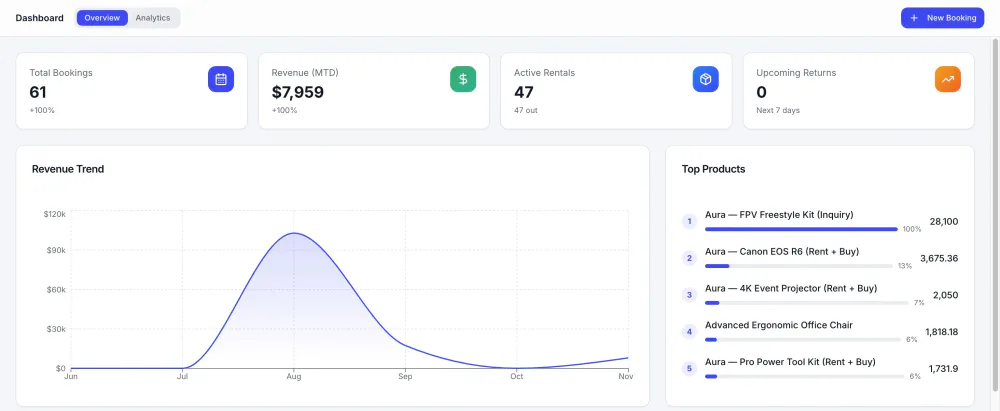
Repeat customers matter because of what they spend, so the revenue charts sit on the same dashboard. The Overview tab shows revenue for the month so far against last month, total bookings, and a Revenue Trend for the last six months.

On Analytics, the Revenue Trend and Booking Volume charts cover the same six months, and the product filter narrows them to one product, category or tag. That's your rental revenue report without a spreadsheet.

Rental Suite
Dashboard Overview with total bookings, revenue this month against last month, active rentals, upcoming returns and the revenue trend

Find and follow up with your regulars

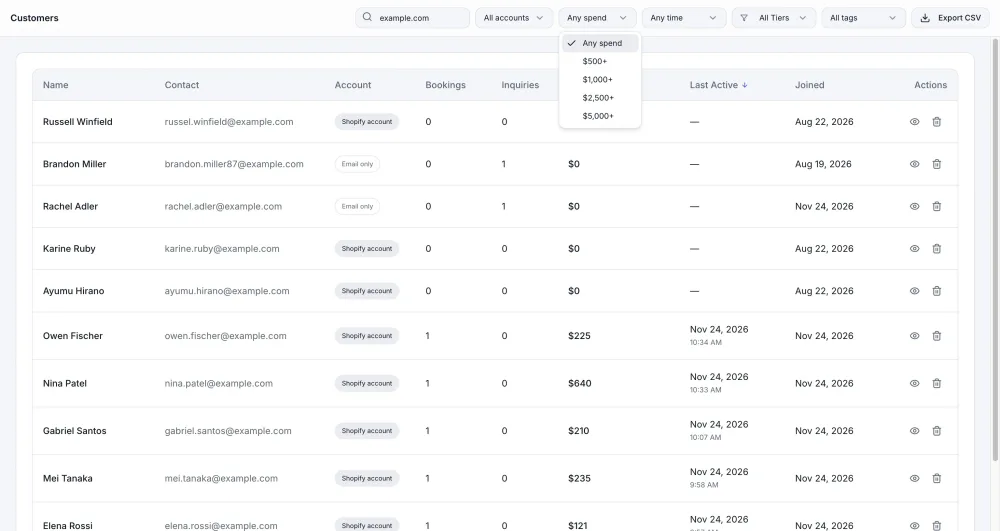
On the Customers list, sort by Bookings or Total Spent, or filter by tier, minimum spend or last activity, to find renters who come back and the ones who haven't booked for a while. Tag them, for example VIP, so they're easy to filter later.

Rental Suite doesn't send marketing campaigns. Export CSV downloads the rows on the current page with each customer's marketing consent, so you can use your own email tool to reach the people who agreed to hear from you.

Rental Suite
Customers list with the minimum spend filter open, beside the account, last active, tier and tag filters and Export CSV

03How it works

Set up repeat customer rate in 4 steps

The steps a merchant takes in the Rental Suite admin, in order.

Read the setup guide

  1. Take bookings through Rental Suite

    Storefront checkouts and New Booking link each booking to a customer profile.

  2. Open Dashboard, then Analytics

    Repeat customer rate and average rentals per customer sit at the top of the tab.

  3. Check your top customers

    Read the lifetime value chart and leaderboard, then click a name to open the profile.

  4. Watch the retention line

    Compare month-1 retention across your recent months of new renters.

05Get started

Try repeat customer rate on your store

Install Rental Suite, then turn on repeat customer rate in the admin. The setup guide walks through each screen.

06FAQ

Repeat customer rate questions

Answers to common questions about repeat customer rate in Rental Suite.

Still have questions?

Ask the team that builds the app. We reply within one business day.

What is a repeat customer rate?

It's the share of your customers who have booked more than once. In Rental Suite it's customers with two or more bookings divided by customers with at least one.

How do I calculate repeat customer rate?

Count the customers with two or more bookings, divide by the customers with at least one booking, and multiply by 100. Rental Suite does this for you on the dashboard's Analytics tab.

How is customer lifetime value worked out for rentals?

In Rental Suite, lifetime value is a customer's total spend so far: the sum of their linked orders, or of their bookings that weren't cancelled when no order is linked. It isn't a forecast.

What does month-1 retention mean?

Of the renters whose first booking fell in a given month, it's the share who booked again in the next calendar month. The chart covers cohorts from the last six months.

Do quote requests count as bookings?

No. Quote requests are counted separately on each customer. Only bookings count toward the repeat rate and rentals per customer.

Can I see my repeat customers in a list?

Yes. Sort the Customers list by Bookings or Total Spent, or filter it by tier or minimum spend. The leaderboard on the dashboard also links to each top customer's profile.