Email and notifications

Edit the booking confirmation email template your renters get

A renter who pays and hears nothing starts emailing you to check. Rental Suite sends a booking confirmation email template you can edit, with the dates, pickup or delivery details and the checkout total filled in from the booking.

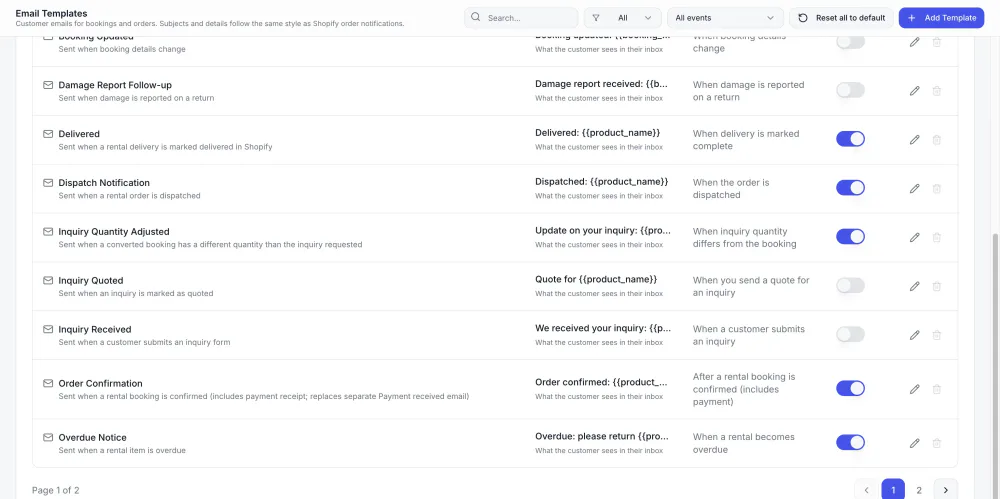
Email Templates list with each customer email's inbox subject, when it sends and its Enabled switch, including Order Confirmation and Overdue Notice

01See it in action

See booking confirmation emails in the admin

A short walkthrough in the Rental Suite admin, with voiceover. It plays muted; press Play with sound to hear it from the start.

Read the setup guide

02Overview

Booking confirmation emails in Rental Suite

Rental Suite's booking confirmation email template is called Order Confirmation, and it's on as soon as you install. It goes to the customer when their rental booking is confirmed: for a booking made on your product page, that's when the Shopify order is paid. It thanks them for the payment, lists what they booked and gives a receipt reference.

You'll find it under Email Templates with every other customer email. Change the subject, rewrite the body in the editor and drop in variables such as the customer's name or the return date. Purchases get their own Purchase Confirmation, so a renter and a buyer each read the right words.

What the rental confirmation email says

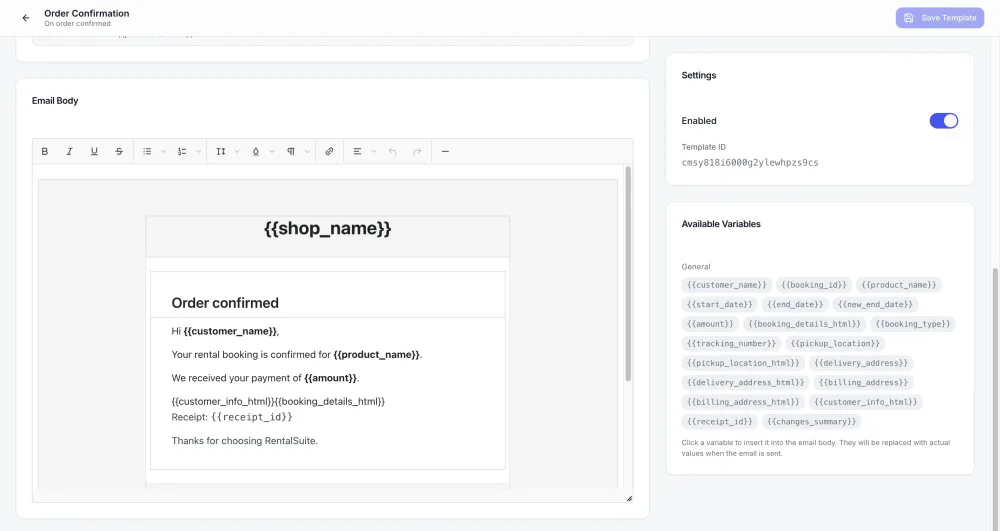
The built-in confirmation opens with your store name, linked to your store, then greets the customer by name and confirms the product. Under that it shows the payment received and three blocks filled in from the booking:

  • Pickup or delivery: the pickup location or delivery address, next to the billing address.
  • Booking details: item, rental start, return by date and quantity.
  • Order summary: the rental subtotal, any promo code, damage protection, the refundable deposit, a pickup fee and the checkout total.

The footer repeats your store name, store link and contact email, taken from your store settings, plus the order or booking reference.
Rental Suite
Order Confirmation email body in the editor: store name header, Order confirmed heading, greeting, the product and amount paid, the address and booking details blocks and the receipt reference

Booking confirmation email template: subject and trigger

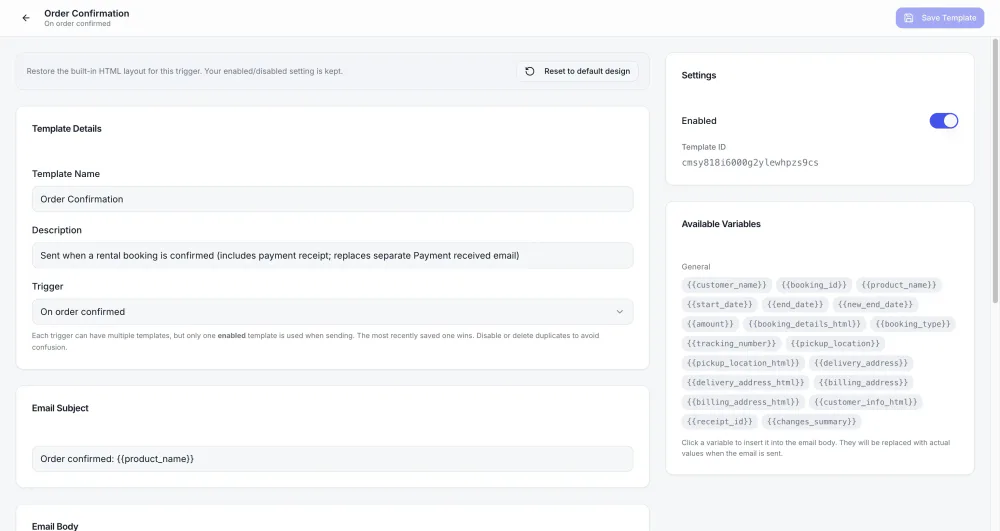
Open the template to edit its Template Name, Description, Trigger and Email Subject. The default subject is "Order confirmed: {{product_name}}", so the inbox shows the product straight away. Change it to your own words and keep the variable if you want the product name in it.

Each trigger can hold more than one template, but only one enabled template sends. Turn one on and Rental Suite switches the others for that trigger off, so you can keep a seasonal version ready without two emails going out.

Rental Suite
Order Confirmation template with the trigger On order confirmed, the subject Order confirmed: {{product_name}}, the Enabled switch and the variables you can click to insert

Email notification templates with variables

The body editor has a formatting toolbar for bold, lists, links, alignment and dividers, and the built-in layout already in place. Click a variable on the right to insert it where your cursor is. When the email sends, each one is replaced with the booking's real value.

  • People and product: {{customer_name}}, {{product_name}}, {{booking_type}}.
  • Dates and money: {{start_date}}, {{end_date}}, {{amount}}.
  • Ready-made blocks: {{customer_info_html}} and {{booking_details_html}} drop in the address and summary tables.
  • References: {{booking_id}} and {{receipt_id}} show the order number when the booking has one.
Rental Suite
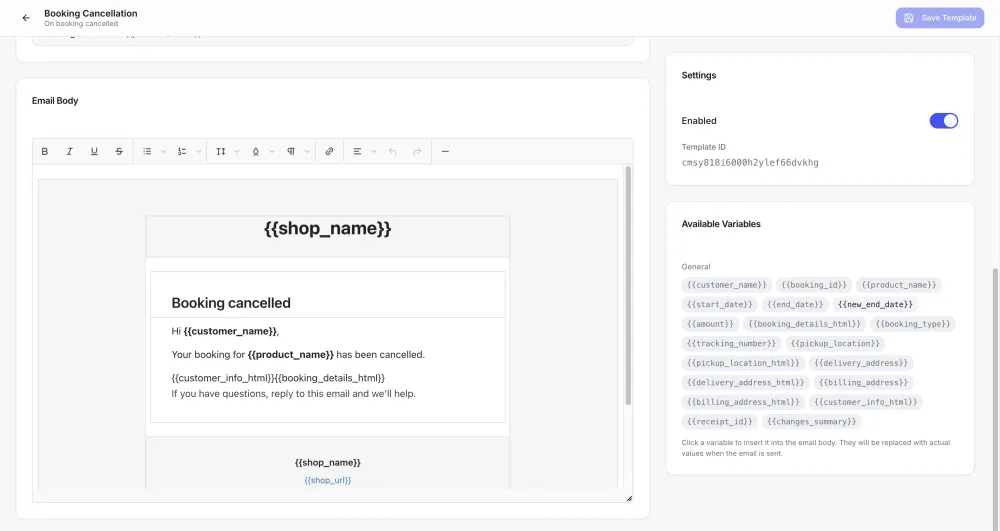
Body editor toolbar for bold, lists, links, alignment and dividers above the built-in email layout, shown here on the Booking Cancellation template

Shopify's own order confirmation stays yours

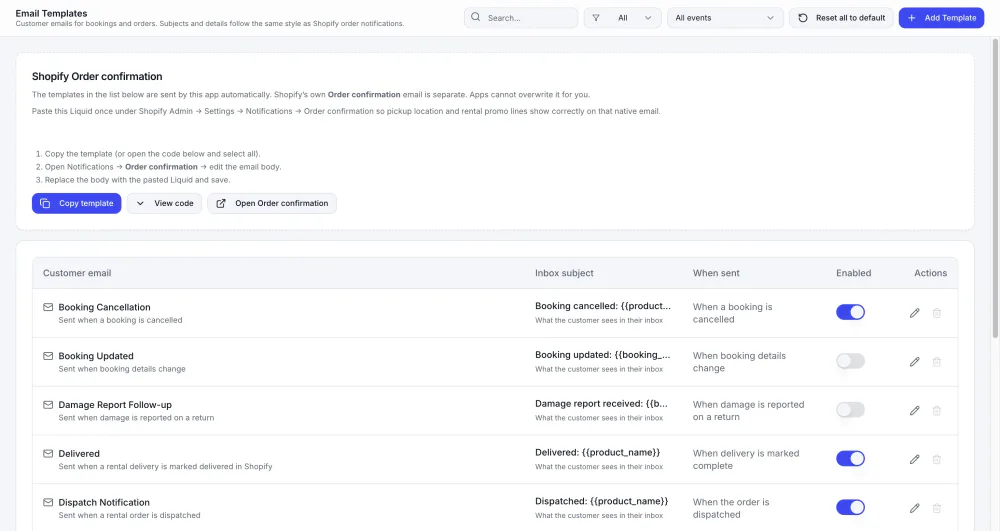
Your Shopify store also sends its own order confirmation email, and an app can't overwrite that one. So the Email Templates page has a card with a Liquid snippet. Copy it, open Settings › Notifications › Order confirmation in your Shopify admin and paste it into the email body, so the pickup location and rental promo lines show correctly there too.

You paste it once. Rental Suite doesn't change your Shopify notification after that, so any edits you make to it stay.

Rental Suite
Shopify Order confirmation card on the Email Templates page with the three paste steps and the Copy template, View code and Open Order confirmation buttons

Reset to the built-in design

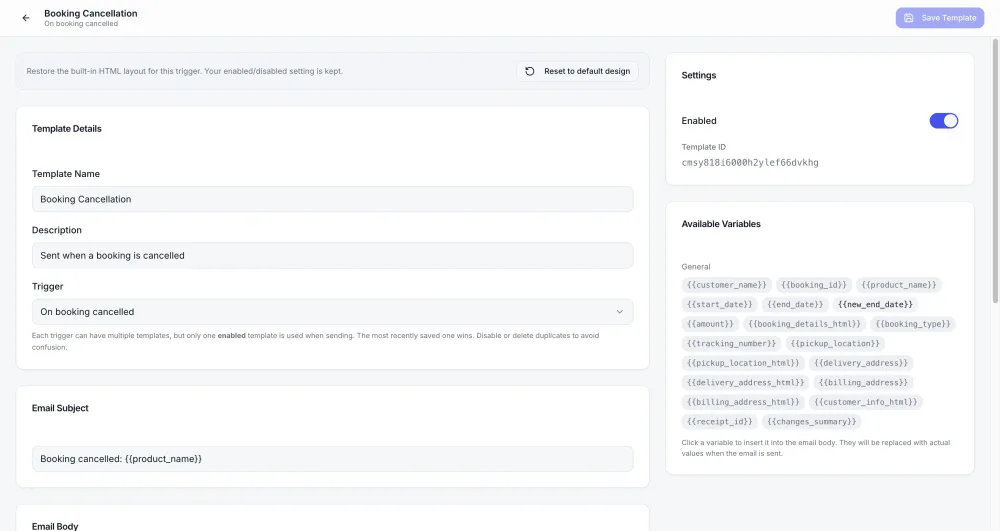
If an edit goes wrong, Reset to default design in the template restores the built-in layout for that trigger and keeps your Enabled setting. Reset all to default on the list does the same for every template at once.

Subscriptions use the same Order Confirmation, with a line pointing subscribers to where they manage their plan. Cancellations, extensions and changed bookings each have their own template, so a confirmation is only ever about a confirmed booking.

Rental Suite
Template editor with the Reset to default design button above the template details; it restores the built-in layout and keeps the Enabled setting

03How it works

Set up booking confirmation emails in 4 steps

The steps a merchant takes in the Rental Suite admin, in order.

Read the setup guide

  1. Open Email Templates

    In Rental Suite, go to Email Templates and find Order Confirmation in the list.

  2. Edit the subject and body

    Change the subject line and the body text, and click variables to insert the customer's name, dates or total.

  3. Save and keep it enabled

    Click Save Template and check the Enabled switch is on, so the email sends on the next confirmed booking.

  4. Paste the Shopify snippet

    Copy the Liquid from the Shopify Order confirmation card and paste it into your Shopify order confirmation email once.

05Get started

Try booking confirmation emails on your store

Install Rental Suite, then turn on booking confirmation emails in the admin. The setup guide walks through each screen.

06FAQ

Booking confirmation emails questions

Answers to common questions about booking confirmation emails in Rental Suite.

Still have questions?

Ask the team that builds the app. We reply within one business day.

What is a booking confirmation email template?

It's the saved email a customer gets when their booking is confirmed, with blanks that fill in from the booking. In Rental Suite it's the Order Confirmation template, and you can change its subject, body and variables.

When does the rental confirmation email send?

When the rental booking is confirmed. For a booking from your product page that's once its Shopify order is paid; for a booking you create in the admin, it's when the booking is confirmed there.

Does the confirmation show the deposit and damage protection?

Yes. The order summary lists the rental subtotal, any promo code, damage protection, the refundable deposit, a pickup fee and the checkout total, when the booking has them.

Will Rental Suite overwrite my Shopify order confirmation?

No. Apps can't overwrite Shopify's order confirmation. You paste the Liquid snippet from the Email Templates page into it yourself, once.

Can I write a different email for purchases?

Yes. Products bought on the Buy tab get the Purchase Confirmation template, which you edit separately from the rental Order Confirmation.